Table of Contents
Magento hosting is not simply about finding a server that can run Magento.
A Magento store is a complex application that depends on multiple services working together:
Web server + PHP + database + search + cache + queue + storage + CDN + monitoring + security
The quality of that architecture can directly affect:
- Website performance
- Checkout reliability
- Search speed
- Scalability
- Security
- Development productivity
- Operational costs
- Customer experience
That is why choosing Magento hosting based only on:
“How much RAM do I get?”
or:
“How many CPU cores?”
is rarely enough.
The better question is:
What hosting architecture does my Magento business actually need?
This guide explains how to evaluate Magento hosting from a business, technical, performance, scalability, security, and cost perspective.
What is Magento hosting?
Magento hosting is the infrastructure and services required to operate a Magento / Adobe Commerce store online.
Unlike a simple website, Magento typically requires a collection of supporting services.
A modern Magento architecture may include:

The exact architecture depends on the Magento version, store size, traffic patterns, integrations, and business requirements.
Adobe’s current system requirements show how much more is involved than a basic PHP server: supported Magento/Adobe Commerce releases use combinations of PHP, nginx, MySQL or MariaDB, OpenSearch/Elasticsearch, RabbitMQ, Valkey/Redis, Composer, and other services depending on the release.
This is why Magento hosting should be treated as an application architecture decision, not simply a server purchase.
Why Magento needs different hosting from a typical website
A basic WordPress website may operate reasonably well with:
- Web server
- PHP
- MySQL
Magento is considerably more demanding.
Magento’s architecture can involve:
- PHP
- nginx
- MySQL/MariaDB
- OpenSearch
- Redis/Valkey
- RabbitMQ
- Varnish
- CDN
- Cron
- Queue consumers
- File storage
- Background processes
- Monitoring
For example, Adobe’s current requirements for Adobe Commerce 2.4.9 list PHP 8.5, OpenSearch 3, MariaDB 12.3 or 11.8, RabbitMQ 4.3, Valkey 9, nginx 1.30, and Composer 2.10 among supported dependencies.
The exact requirements change by Magento version.
Therefore:
Never choose Magento hosting without first identifying the exact Magento version you intend to run.
Magento hosting types
There isn’t one type of Magento hosting that is best for every business.
The major approaches are:
1. Shared hosting
Multiple websites share the same infrastructure.
This is generally the least attractive option for serious Magento stores.
The problem isn’t simply resource limits.
It is also:
- Resource contention
- Limited control
- Limited configuration
- Performance variability
- Security considerations
- Poor scalability
- Limited Magento-specific expertise
For a business where ecommerce revenue depends on the website, saving a small amount on hosting can create disproportionate operational risk.
2. VPS hosting
A VPS gives you a virtual server with allocated resources.
It provides more control than shared hosting and can be suitable for smaller Magento stores.
However, the important question is:
Who manages the server?
A VPS is not automatically “managed.”
You may still be responsible for:
- Linux
- nginx
- PHP
- Database
- Security
- Backups
- Monitoring
- Magento
- Updates
- Performance
So a cheap VPS can become expensive in engineering time.
3. Dedicated server
A dedicated server provides physical resources for your environment.
This can provide:
- Predictable resources
- Greater control
- Custom configuration
- Strong performance potential
But dedicated hardware isn’t automatically better.
Modern cloud architectures can provide flexibility and scalability that a single physical server cannot.
The right question isn’t:
“Is dedicated better?”
It is:
“What architecture provides the resources and reliability our store actually needs?”
4. Cloud hosting
Cloud infrastructure allows Magento environments to use flexible compute, storage, networking, databases, caching, and other services.
This can be particularly useful when:
- Traffic fluctuates
- The business is growing
- Multiple environments are needed
- High availability matters
- Scaling is important
- Integrations are numerous
Adobe Commerce on cloud infrastructure, for example, uses services such as nginx, MySQL/MariaDB, Fastly CDN, PHP, Redis/Valkey, RabbitMQ, and OpenSearch/Elasticsearch depending on the configuration and release.
Cloud is not automatically better.
It can also introduce:
- Configuration complexity
- Infrastructure costs
- DevOps requirements
- Monitoring requirements
- Cloud networking complexity
Again:
architecture first, hosting label second.
5. Managed Magento hosting
Managed Magento hosting means the hosting provider takes responsibility for some portion of the infrastructure and platform operations.
Depending on the provider, this may include:
- Server management
- Magento deployment
- Security
- Backups
- Monitoring
- Performance optimization
- CDN
- Caching
- Support
- Magento upgrades
This can be valuable for businesses without a strong internal infrastructure team.
But “managed” means different things to different hosting companies.
Always ask:
What exactly is managed?
6. Adobe Commerce Cloud
For businesses using Adobe Commerce, Adobe offers its own cloud infrastructure.
Adobe’s current cloud architecture includes development/integration, staging, and production environments, with production architecture designed for high availability on its Pro offering.
Adobe’s cloud infrastructure also supports scaling architectures where different tiers can scale independently for larger deployments.
This can be attractive for businesses that want a platform closely aligned with Adobe Commerce.
But it isn’t automatically the most economical option for every Magento business.
What makes good Magento hosting?
A good Magento hosting environment should provide the infrastructure required for your specific workload.
The major areas to evaluate are:
- CPU
- Memory
- Storage
- Database
- PHP
- Web server
- Search
- Cache
- CDN
- Queue processing
- Network
- Security
- Backups
- Monitoring
- Scalability
- Support
Let’s examine each.
1. CPU
Magento can be CPU-intensive.
CPU requirements depend on:
- Traffic
- Number of requests
- PHP workload
- Catalog size
- Extensions
- APIs
- Checkout activity
- Cron jobs
- Queue consumers
- Reindexing
But simply buying more CPU doesn’t automatically solve performance problems.
If the bottleneck is:
database
more CPU may not help.
If the bottleneck is:
slow third-party API
more CPU won’t help.
If the bottleneck is:
bad code
more CPU may only hide the problem temporarily.
Therefore:
Measure before scaling.
2. RAM
Magento can consume significant memory because of:
- PHP processes
- Magento application
- Composer
- CLI operations
- Indexing
- Cache
- Database
- Search
- Queue consumers
Insufficient memory can cause:
- Slowdowns
- Process failures
- Out-of-memory errors
- Unstable deployments
- Poor concurrency
But again, more RAM isn’t always the answer.
You need to understand which services consume the memory.
3. Storage
Storage affects more than simply how many products you can store.
Consider:
- Product images
- Media
- Logs
- Database
- Backups
- Deployment artifacts
- Temporary files
- Search indexes
SSD/NVMe storage can be particularly valuable because Magento performs many database and filesystem operations.
But storage performance should be evaluated alongside:
- IOPS
- latency
- database architecture
- filesystem
- backups
4. Database
For many Magento stores, the database is one of the most important components.
Problems can arise from:
- Slow queries
- Large tables
- Poor indexes
- Extension-generated data
- Reporting queries
- Search-related operations
- Checkout queries
- Concurrent writes
Simply placing Magento on a powerful server does not fix a poorly designed database workload.
A good hosting environment should allow you to:
- Monitor database performance
- Identify slow queries
- Optimize indexes
- Scale appropriately
- Separate workloads where necessary
5. PHP
Magento is heavily dependent on PHP.
The supported PHP version depends on the exact Magento release.
For example, Adobe’s current requirements list PHP 8.5 for Adobe Commerce 2.4.9 and PHP 8.4/8.3 for 2.4.8-p5.
This matters because hosting providers may advertise:
“Latest PHP available.”
That doesn’t necessarily mean:
“Correct PHP version for your Magento release.”
The environment must match the supported software matrix.
Also consider:
- PHP-FPM configuration
- OPcache
- Worker count
- Memory limits
- Process management
Poor PHP-FPM configuration can become a bottleneck even when the server has plenty of resources.
6. Web server
nginx is widely used in modern Magento deployments.
Adobe’s current requirements include nginx versions matched to specific Commerce releases.
The important factors include:
- Configuration
- Compression
- TLS
- Connection handling
- Static content
- Proxying
- Cache integration
- PHP-FPM communication
A properly configured web server is part of performance.
7. Search engine
Magento 2.4+ requires a search engine based on Elasticsearch or OpenSearch depending on the supported release. Adobe’s documentation states that Commerce installations from 2.4 require Elasticsearch or OpenSearch for catalog search.
This means a Magento hosting provider that treats search as an afterthought is a red flag.
Search affects:
- Product discovery
- Category filtering
- Search results
- Layered navigation
- Customer experience
Search performance should be monitored separately from the web server.
8. Redis / Valkey
Caching can dramatically reduce the amount of work Magento needs to perform for repeated requests.
Modern supported Magento versions use Redis or Valkey depending on the release and deployment.
Adobe’s current requirements show Valkey support for newer releases and Redis support for certain older versions.
Cache architecture can include:
- Configuration cache
- Page cache
- Session storage
- Object cache
The exact architecture should match the Magento version and workload.
9. Varnish and full-page caching
Magento can benefit significantly from full-page caching.
Instead of generating every page dynamically, cached responses can be served much faster.
This can reduce:
- PHP work
- Database queries
- Server load
Adobe’s supported infrastructure includes Varnish for relevant Commerce versions and uses Fastly CDN in its cloud architecture.
But caching must be designed carefully.
Dynamic pages such as:
- Cart
- Customer account
- Checkout
have different requirements from cacheable catalog pages.
10. CDN
A CDN can improve delivery of:
- Images
- CSS
- JavaScript
- Fonts
- Static assets
- Cached pages
It can also help reduce the load on the origin server.
But:
A CDN cannot fix a slow backend.
If TTFB is high because the Magento application is slow, putting a CDN in front of static files won’t solve the underlying application bottleneck.
A CDN is one layer of the architecture.
11. Queue processing
Magento uses asynchronous processes for various operations.
Depending on your implementation, queues may be involved in:
- Order processing
- Inventory
- Integrations
- Indexing
- Background tasks
RabbitMQ and ActiveMQ Artemis are among the supported services for current Commerce releases.
Poorly configured queue consumers can create delayed operations even when the storefront appears healthy.
12. Cron jobs
Magento depends on scheduled processes.
Cron can handle tasks such as:
- Indexing
- Emails
- Catalog updates
- Price rules
- Sitemap generation
- Cleanup
- Integration tasks
A hosting provider should make it possible to monitor cron health.
A store can appear “online” while critical background processes are failing.
Magento hosting and performance
This is where hosting becomes directly connected to revenue.
Imagine:
Customer
↓
Product page
↓
Add to cart
↓
Checkout
↓
Payment
Every part of that journey depends on multiple layers.
A slow store can result from:
Hosting
or:
Magento
or:
Extension
or:
Database
or:
Third-party API
or:
Frontend
or:
Integration
Therefore:
Hosting should be diagnosed as part of the entire performance architecture.
What does good Magento performance look like?
Don’t evaluate performance only by:
“The website loads quickly.”
Track measurable indicators.
Infrastructure
- CPU utilization
- Memory utilization
- Disk I/O
- Network latency
- Database load
Application
- PHP execution time
- Request latency
- API response time
- Queue latency
- Cron failures
Web performance
- TTFB
- LCP
- INP
- CLS
- Page weight
Business
- Conversion rate
- Checkout completion
- Revenue per session
- Cart abandonment
This is important because technical performance should ultimately be connected to business performance.
How much hosting does Magento need?
There is no universal answer.
Anyone telling every Magento store:
“You need 8 CPU and 16 GB RAM”
is guessing.
A small store and a large multi-store operation have very different requirements.
You need to consider:
Traffic
- Average requests
- Peak requests
- Bots
- Campaign traffic
Catalog
- Products
- Attributes
- Variants
- Categories
Transactions
- Orders per hour
- Peak checkout concurrency
Integrations
- ERP
- CRM
- PIM
- Payment
- Marketplace
Business model
- B2C
- B2B
- Wholesale
- Subscription
Architecture
- Single server
- Separate database
- Multiple web nodes
- Load balancer
- Cloud
A better way to size Magento hosting
Start with:
Current workload
↓
Peak workload
↓
Expected growth
↓
Bottleneck analysis
↓
Capacity requirement
Instead of:
Competitor uses 32 GB RAM → therefore we need 32 GB RAM.
Your hosting architecture should be based on measured workload.
Magento hosting for small stores
A smaller Magento store may not need a large distributed architecture.
A properly configured environment might include:
- Dedicated VPS/cloud instance
- PHP-FPM
- nginx
- Database
- OpenSearch
- Redis/Valkey
- Cron
- Queue processing
- CDN
The key is good configuration.
A smaller, well-optimized environment can outperform a much larger poorly configured environment.
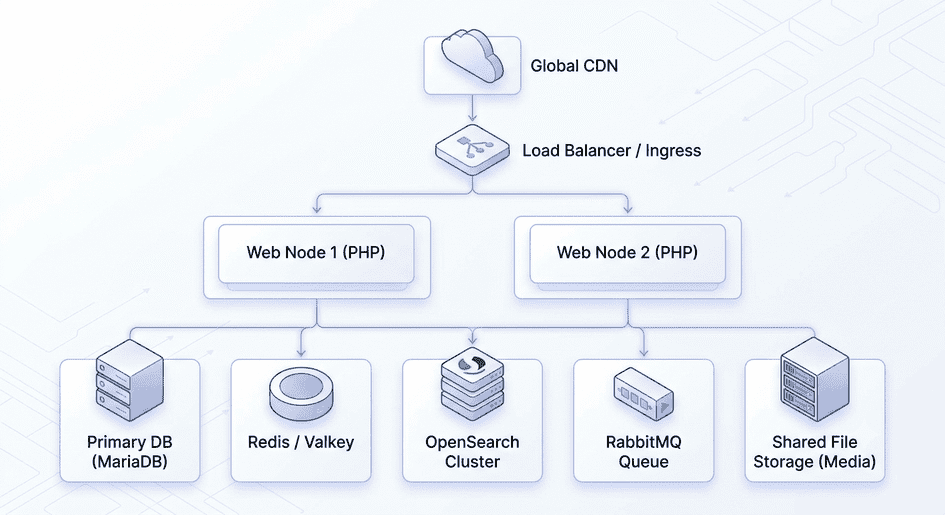
Magento hosting for growing stores
As traffic and operational complexity increase, you may separate services.
For example:
CDN
│
↓
Load Balancer
/ \
↓ ↓
Web Node Web Node
│ │
└─────┬─────┘
↓
Database
│
┌───────┴────────┐
↓ ↓
Cache Search
│
↓
Queues
This gives you more control over scaling individual components.
Magento hosting for high-traffic ecommerce
At higher scale, the architecture becomes much more important.
You may need:
- Multiple web nodes
- Load balancing
- Separate database infrastructure
- Read replicas where appropriate
- Dedicated cache
- Search cluster
- Queue infrastructure
- CDN
- Object storage
- Monitoring
- Automated deployment
- Disaster recovery
Adobe’s current cloud architecture demonstrates this principle: its Pro architecture uses multiple production nodes, while larger scaled architectures separate service and web tiers so they can scale independently.
The lesson isn’t:
“You need Adobe’s architecture.”
The lesson is:
At scale, Magento hosting becomes an architecture problem rather than a server problem.
Magento hosting security
Hosting security should be evaluated at multiple levels.
Infrastructure
- Firewall
- Network controls
- DDoS protection
- SSH access
- Access restrictions
Operating system
- Security patches
- Least privilege
- Monitoring
- Hardening
Magento
- Security patches
- Extension security
- Admin protection
- Deployment controls
Application
- Authentication
- Authorization
- API security
- Input validation
Data
- Encryption
- Backups
- Access control
- Retention
A hosting provider that simply says:
“We provide SSL.”
is not describing a complete security strategy.
Magento hosting backups
Backups are not optional.
But:
Having backups is not the same as having a recovery strategy.
Ask:
How often are backups taken?
Where are they stored?
Are they geographically separate?
Are they encrypted?
How long are they retained?
Can individual databases be restored?
Can the entire environment be restored?
How frequently is recovery tested?
The most important question is:
How quickly can the business recover?
That is your recovery objective.
Disaster recovery
For a serious ecommerce business, define:
RPO
Recovery Point Objective
How much data can you afford to lose?
RTO
Recovery Time Objective
How quickly must the store be operational again?
For example:
If your RTO is:
24 hours
your architecture will be different from a business requiring:
30 minutes.
Hosting decisions should reflect the actual business risk.
Magento hosting and uptime
Don’t simply ask:
“Do you offer 99.99% uptime?”
Ask:
What exactly does the SLA cover?
Understand:
- Network
- Hardware
- Storage
- Database
- Managed services
- Scheduled maintenance
- Application failures
A hosting company can have excellent infrastructure uptime while your Magento store is down because:
- PHP crashed
- Database failed
- Extension broke
- Queue stopped
- Deployment failed
Therefore:
Infrastructure uptime and ecommerce availability are not the same thing.
Magento hosting support
This is often more valuable than raw server specifications.
Ask:
Does support understand Magento?
Can they troubleshoot PHP?
Can they investigate database issues?
Do they understand Redis/Valkey?
Do they understand OpenSearch?
Can they investigate slow queries?
Can they help during traffic spikes?
Is support available during incidents?
Do they monitor Magento-specific processes?
A provider that understands only infrastructure may not be enough for a complex Magento business.
How to evaluate Magento hosting companies
Don’t compare hosting providers only by:
- Price
- RAM
- CPU
- Storage
Instead create a scorecard.
| Area | Questions |
|---|---|
| Magento expertise | Do they understand Magento architecture? |
| Performance | How do they monitor and optimize? |
| Infrastructure | What architecture do they provide? |
| Scalability | Can resources scale? |
| Security | What is included? |
| Backups | How are backups handled? |
| Recovery | What are the RTO/RPO capabilities? |
| Monitoring | What is monitored? |
| Support | Who responds during incidents? |
| Deployment | How are changes released? |
| Staging | Is staging available? |
| CDN | What CDN is supported? |
| Caching | What caching architecture is available? |
| Search | How is OpenSearch/Elasticsearch handled? |
| Database | What database architecture is provided? |
| Cost | What is the total monthly/annual cost? |
This is much more useful than a “Top 10 Magento Hosting Companies” list.
The hidden cost of cheap Magento hosting
Imagine two providers.
Provider A
$100/month
But you manage:
- Server
- Security
- Backups
- Magento
- Monitoring
- Performance
- Database
Provider B
$500/month
Includes:
- Managed infrastructure
- Magento monitoring
- Backups
- Security
- Performance support
- Incident response
Provider A looks cheaper.
But if your team spends:
10 engineering hours/month
managing the environment, the real cost may be higher.
Therefore:
Hosting cost should include the people required to operate it.
Magento hosting total cost of ownership
Calculate:
Hosting TCO =
Infrastructure
Managed services
CDN
Backups
Monitoring
Security
Support
DevOps
Magento maintenance
Incident management
Engineering time
That is your real cost.
What should you look for in Magento managed hosting?
A strong managed Magento environment should ideally provide:
Infrastructure
- Magento-compatible infrastructure
- SSD/NVMe storage
- Adequate CPU
- Adequate RAM
- Reliable networking
Application
- Supported PHP
- Magento-aware configuration
- OPcache
- Cron
- Queue management
Performance
- Full-page caching
- Redis/Valkey
- CDN
- Monitoring
- Database optimization
Security
- Firewall
- SSL/TLS
- Malware/security monitoring
- Patch support
- Access controls
Reliability
- Automated backups
- Disaster recovery
- Monitoring
- Incident response
Development
- Staging
- Git-based deployments
- SSH
- CI/CD support
- Rollback capability
Magento hosting checklist
Before choosing a provider, check:
Platform
- Supported Magento version
- Supported PHP version
- Supported database
- OpenSearch/Elasticsearch
- Redis/Valkey
- Queue support
- nginx
Performance
- CDN
- Full-page cache
- Object cache
- OPcache
- Database monitoring
- PHP monitoring
Security
- Firewall
- TLS
- Access control
- Security patching
- Monitoring
Reliability
- Automated backups
- Offsite backups
- Disaster recovery
- Defined RTO
- Defined RPO
Development
- Staging
- Deployment process
- SSH
- Git
- Rollback
Support
- Magento expertise
- 24/7 availability if required
- Incident response
- Performance support
Commercial
- Monthly cost
- Setup cost
- Backup cost
- CDN cost
- Support cost
- Scaling cost
- Migration cost
Should you use a Magento hosting company or manage it yourself?
This is ultimately an organizational decision.
Self-managed Magento hosting may make sense when:
- You have strong DevOps expertise.
- You understand Magento infrastructure.
- You have monitoring systems.
- You can handle incidents.
- You have security processes.
- You have disaster recovery.
- You want maximum control.
Managed Magento hosting may make sense when:
- Your team is small.
- Ecommerce is business-critical.
- You don’t want to manage infrastructure.
- You need specialist support.
- You want predictable operations.
- Your developers should focus on the application rather than servers.
The right choice depends on your organization’s capabilities.
Does better Magento hosting make Magento faster?
Sometimes.
But this distinction is critical.
Suppose your current store has:
- Poor database queries
- Heavy extensions
- Inefficient PHP code
- Too many third-party requests
Moving to a larger server may improve performance temporarily.
But the underlying problem remains.
A proper performance investigation should examine:
Infrastructure
→ PHP
→ Magento
→ Database
→ Cache
→ Search
→ Extensions
→ Frontend
→ Third parties
This is why we should never say:
“Your Magento store is slow, so buy a bigger server.”
The right answer is:
Find the bottleneck first.
Magento hosting and Magento upgrades
Hosting architecture should make upgrades easier, not harder.
A good environment should allow:
Development
↓
Staging
↓
Testing
↓
Production
with controlled deployments.
You should be able to test:
- Magento upgrades
- Security patches
- PHP upgrades
- Extension updates
- Database changes
before production.
This is one reason staging environments are so important.
How often should Magento hosting be reviewed?
Don’t wait until the server fails.
Review the architecture when:
- Traffic grows significantly
- Conversion increases
- Catalog expands
- New markets launch
- New integrations are added
- B2B is introduced
- Peak season approaches
- Magento version changes
- Performance deteriorates
- Infrastructure costs increase
A hosting architecture that worked two years ago may no longer be appropriate.
Magento hosting before peak season
If your business has major seasonal peaks, don’t wait until the traffic arrives.
Review:
- CPU
- Memory
- Database
- Search
- Cache
- CDN
- Queue consumers
- Integrations
- Payment systems
- Monitoring
- Backups
Then perform load and stress testing where appropriate.
The goal is not simply to survive traffic.
It’s to understand:
Where does the architecture begin to fail under load?
Magento hosting: the most important lesson
The best Magento hosting is not necessarily:
- The cheapest
- The fastest server
- The biggest server
- The most expensive provider
- The provider with the most features
It is the environment that provides the right balance of:
Performance + Reliability + Security + Scalability + Operational simplicity + Cost
for your business.
Final recommendation
Before choosing Magento hosting, determine:
1. Your Magento version
The supported software stack changes between releases. Adobe’s current requirements demonstrate substantial differences across release lines, so hosting should be selected against the exact version you operate.
2. Your workload
Understand:
- Traffic
- Orders
- Catalog
- Integrations
- Peak periods
3. Your bottlenecks
Measure before buying more infrastructure.
4. Your organizational capability
Decide whether your team should own infrastructure.
5. Your availability requirements
Define RTO and RPO.
6. Your three-year TCO
Don’t compare hosting plans based only on monthly price.
TheCoachSMB Perspective
At TheCoachSMB, we don’t believe Magento hosting should begin with:
“Which hosting company is cheapest?”
It should begin with:
“What does this ecommerce business actually require from its infrastructure?”
A Magento store is not simply a PHP website.
It is an interconnected commerce system.
Web server → PHP → Magento → Database → Search → Cache → Queues → CDN → Integrations
If one layer becomes a bottleneck, the customer can feel the impact.
That’s why hosting decisions should be connected to:
Business requirements → Performance → Reliability → Scalability → Security → Cost
And when a Magento store is slow, unstable, or expensive to operate, the first question shouldn’t necessarily be:
“Should we buy better hosting?”
It should be:
“Where is the actual constraint?”
Once you know that, you can make a much better decision about whether to:
Optimize the existing infrastructure → Change hosting → Redesign the architecture → Upgrade Magento → Or consider a different ecommerce platform.
The right hosting architecture should support the business.
It should never become the business’s biggest technology problem.
Frequently Asked Questions
What is Magento hosting?
Magento hosting is the infrastructure and services used to run a Magento or Adobe Commerce store, including web servers, PHP, databases, caching, search, queues, storage, CDN, security, backups, and monitoring.
What is the best Magento hosting?
There is no universal best Magento hosting provider. The right provider depends on your Magento version, traffic, catalog, integrations, performance requirements, operational capabilities, security needs, and budget.
Can Magento run on shared hosting?
Technically, some environments may support limited Magento deployments, but shared hosting is generally a poor fit for serious ecommerce operations because of resource contention, limited control, and limited scalability.
How much RAM does Magento need?
There is no universal number. Memory requirements depend on Magento version, catalog size, traffic, PHP processes, database workload, search, caching, extensions, and other services.
Is VPS hosting good for Magento?
A VPS can be appropriate for smaller Magento stores when properly configured. The important question is whether the VPS has adequate resources and whether someone is responsible for managing and securing the environment.
Is cloud hosting better for Magento?
Cloud hosting can provide flexibility, scalability, and access to managed infrastructure services, but it can also introduce additional complexity. The right choice depends on your workload and operational requirements.
Does Magento hosting affect SEO?
Hosting can affect technical performance, availability, and page speed, which can indirectly affect user experience and SEO. But hosting alone does not determine search rankings.
Does Magento hosting affect website speed?
Yes, infrastructure can affect performance, but a slow Magento store may also be caused by application code, extensions, database queries, frontend implementation, third-party services, or integrations.
Should I use managed Magento hosting?
Managed hosting can make sense when ecommerce is business-critical but you don’t want your internal team to own all infrastructure responsibilities. Evaluate exactly what the provider manages before signing up.
1. Cloudways – Min $10/Month
Cloudways is always the first choice to be considered when you try your best to find the best Magento hosting provider that fits your upcoming online stores. There is 40% discount till 2 DEc 2024.
Different than other services, Cloudways gives you 5 hosting plans to choose from their 5 world-class cloud providers: Digital Ocean, Linode, Vultr, Amazon Web Services (AWS) and Google Computer Engine (GCE).You could also choose to whether use their services in a monthly plan or hourly plan.
The cheapest option is from Digital Ocean Data Center with only around $10/month while the most expensive one comes from AWS Data Centers with the cost of around $274/month.
The main reason for this large pricing gap isn’t only about the specs of the servers but also the supporting options that come with them.
Pros:
- 24/7 Real-time monitoring and 24/7/365 Support team via live chat. Their outstanding support team will guide you in less than a minute, and very eager to help if you have any problems with your site.
- Free Migration Service that came along when you purchase the hosting plan.
- Automated & Regularly Backups with Dedicated Firewall.
- No restriction on the number of websites you can install. Unlimited Applications
- Easy to install any CMS or PHP based system.
- Pre-configured PHP-FPM.
- 1-Click Server Cloning & Advanced Server Management.
- PHP 7 Ready Servers with CloudwaysCDN.
- Built-in Full Page Cache of Magento for incredible speed.
- 60+ Data Centers across the globe.
- Free Trial Without Credit Card.
- Pay As You Go
- Free SSL Certificates
- SSD-Based Servers
Cons:
- The free trial is not available for AWS & GCE. You need to upgrade your account to launch and access both of these servers.
- With AWS & GCE, Disk Sizes are configurable and Bandwidth is on pay as you go basis.
- Lack of some basic services such as email accounts & domain registrations.
- Offer no cPanel & require technical knowledge.
Click Here for more details.
2. Bluehost – Min $2.95/Month
Whether you are a small or a large Magento eCommerce, Bluehost Magento 2 hosting does everything for your business. Magento 2 assists your website in marketing, search engine optimization and create catalog pages.
You should know that Bluehost applies its hosting services to 2 million websites in the world thanks to its fast loading speed. Your Magento 2 eCommerce site will appear in less than 2 seconds.
Hosting Plans and Features
Bluehost offers a one-click installation with any plan. It is easy to use c-panel from where you can manage to host and create databases as you like.
This Magento 2 hosting has a shared function with three basic plans (Basic, Plus, and Prime) to fit the needs of different webmasters further.
Pros:
- Pricing: It has hosting plans that can serve multiple budget categories
- Transparency: No hidden charges
- Scope: Hosts more than 2 million websites with 99.97% uptime
- Free domain: after sign up, you will get one free domain
Cons:
- Comparatively high domain renewal price
- The upsell process is quite aggressive during sign up, and you need to uncheck all add-ons if you do not need them
Click Here for more details.


I am new to magento development . I need to create a ecommerce website for an external client . I have installed Magento 2.4 in my system and created a store as per your guidance. My question is how to release this store to client for testing . Can I just copy paste the entire magento code into another system or how I have to provide it same store to client for testing .Please Reply..
For this you need have domain and hosting.
– Is there any domain and hosting belongs to you?
– Have your client provided you any domain and hosting?
Thanks