
No products in the cart.
- Published: Sep 02, 2026 | Updated: Sep 02, 2026

Magento 2 Database Performance Optimization: How to Diagnose and Fix Slow Database Queries
Table of Contents
When a Magento 2 store becomes slow, the database is often one of the first places developers look.
And that’s reasonable.
Magento is a database-heavy application. Product catalogs, customers, orders, quotes, inventory, configuration, pricing, promotions, extensions, and custom functionality all depend on the database.
But there is a mistake I see quite often:
Assuming that a slow Magento 2 store means the database needs to be optimized.
Sometimes it does.
Sometimes the database is only showing the symptoms of a problem somewhere else.
I’ve seen performance investigations start with increasing MySQL memory, adding server resources, cleaning tables, or adding indexes—before anyone has established what is actually slow.
That is backwards.
My preferred approach is much simpler:
Measure → Identify → Understand → Fix → Measure again.
Database optimization should start with diagnosis, not a checklist of MySQL settings.
What Role Does the Database Play in Magento 2 Performance?
A typical Magento request can involve considerably more database activity than it appears to from the outside.
A customer might request a product page:
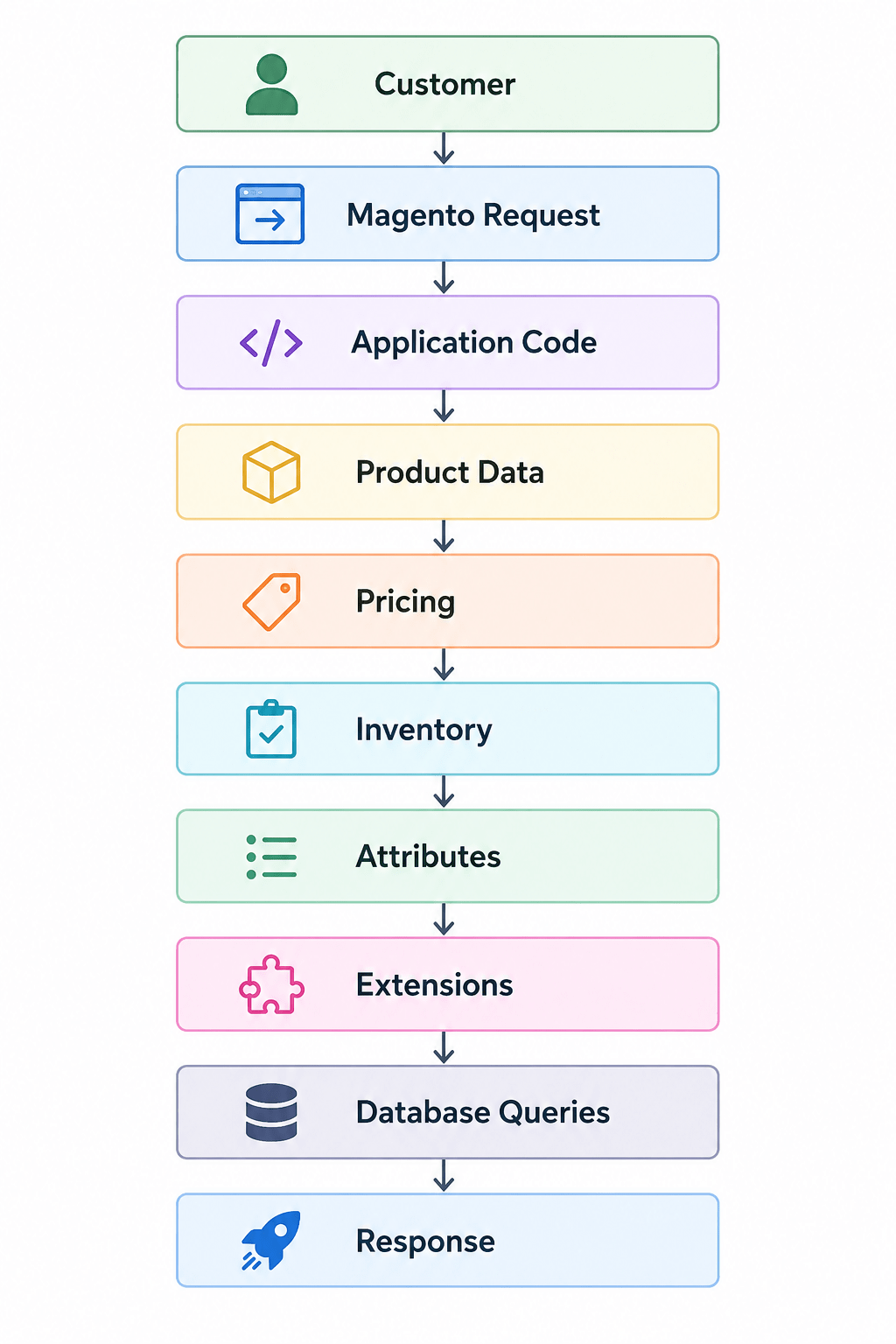
Not every step necessarily results in a database query, and caching can change the picture significantly.
But the important point is that Magento’s application layer and database are closely connected.
If a request causes expensive database operations, the application may spend much of its time waiting for the database.
And the opposite is also true.
A database can be perfectly healthy while the actual bottleneck is:
- PHP execution
- an external API
- an extension
- custom code
- frontend JavaScript
- caching
- server resources
- network latency
So the first question shouldn’t be:
“How do I optimize MySQL?”
It should be:
“Is the database actually the bottleneck?”
Common Symptoms of Magento 2 Database Performance Problems
Database problems don’t always present themselves as an obvious database error.
You may instead notice symptoms such as:
- Product pages taking too long to load
- Category pages becoming slower as the catalog grows
- Slow Magento Admin pages
- Product saves taking a long time
- Checkout operations becoming slower
- Imports taking longer than expected
- Cron jobs running for hours
- Reindexing taking too long
- High MySQL CPU usage
- High database disk I/O
- Large numbers of database connections
- Queries that remain active for a long time
- Locking or transaction contention
- Performance becoming worse as traffic or data volume increases
The important thing is that these symptoms don’t automatically prove that the database is responsible.
They tell you where to start investigating.
The First Rule: Don’t Optimize What You Haven’t Measured
This is probably the most important performance principle.
If someone tells me:
“The Magento database is slow.”
My next question is:
“What makes you think the database is slow?”
There should be evidence.
For example:
- A specific query takes several seconds.
- MySQL CPU is consistently saturated.
- A query examines a very large number of rows.
- The database is waiting on disk I/O.
- There are long-running transactions.
- Database locks are delaying requests.
- The application is repeatedly executing an expensive query.
Without evidence, “database optimization” can quickly become a collection of guesses.
And guesses are particularly dangerous in production systems.
A change that improves one workload can make another workload worse.
Step 1: Find Out What Is Actually Slow
Before looking at individual SQL queries, identify the operation that has the problem.
Is it:
- Storefront?
- Product page?
- Category page?
- Search?
- Checkout?
- Magento Admin?
- Product save?
- Import?
- Cron?
- Indexing?
This distinction matters.
For example, if the storefront is fast but a particular Admin grid takes 20 seconds to load, I wouldn’t immediately start changing the database server configuration.
I’d first investigate what that Admin operation is doing.
Likewise, if cron is consuming significant database resources, the problem might be a particular cron job or extension rather than the database engine itself.
Step 2: Look for Slow or Long-Running Queries
Once you know the problematic operation, the next step is to identify the database work associated with it.
MySQL provides tools for investigating active queries.
For example:
SHOW FULL PROCESSLIST;
This can help show what MySQL is currently doing.
You can look for:
- Queries running for a long time
- Queries waiting
- Locked operations
- Unexpectedly expensive queries
- Repeated operations
For more systematic analysis, slow query logging and database monitoring can provide a much better picture over time.
A single query seen once may not tell you much.
A query executed thousands of times and consistently consuming significant database time is a much more interesting candidate.
Step 3: Understand the Query Before Changing Anything
Finding a slow query is only the beginning.
The next question is:
Why is this query slow?
This is where EXPLAIN becomes useful.
For example:
EXPLAIN SELECT ...;
The execution plan can help reveal how MySQL intends to retrieve the data.
You can investigate things such as:
- Which indexes are being considered
- Which index is actually being used
- How many rows are expected to be examined
- How tables are joined
- Whether large table scans are occurring
- How sorting and filtering are being performed
On supported MySQL versions, EXPLAIN ANALYZE can provide additional information about actual execution.
The objective isn’t to stare at an execution plan and declare that something “looks complicated.”
The objective is to understand how much work MySQL is actually doing.
Full Table Scans Are Not Automatically Bad
One thing worth mentioning is that performance advice often becomes too simplistic.
You may hear:
“Full table scans are bad.”
Not necessarily.
If a table contains 20 rows, scanning the entire table may be completely reasonable.
The problem is when MySQL has to scan a very large amount of data to find a relatively small result set, particularly for frequently executed queries.
Context matters.
That’s why I prefer looking at:
How much work is being done?
rather than:
Is this query using an index?
Indexes: Useful, But Not a Magic Button
Indexes are one of the most important tools for database performance.
A suitable index can allow MySQL to locate data much more efficiently instead of examining large portions of a table.
But “add an index” shouldn’t be the automatic answer to every slow query.
Indexes have costs.
They consume storage and can increase the work required when data is inserted or updated.
Magento also has many tables and extensions can introduce additional database structures.
So the goal isn’t:
Maximum number of indexes.
The goal is:
Appropriate indexes for the actual workload.
Duplicate Indexes Can Also Be a Problem
Magento installations can evolve over many years.
Extensions get installed and removed.
Custom modules get developed.
Features change.
Database schemas change.
As a result, it’s worth checking whether indexes are duplicated or unnecessary.
Two indexes that provide essentially the same access path don’t necessarily make a database faster.
They can increase storage requirements and write overhead without providing meaningful benefit.
Database optimization is therefore not simply about adding things.
Sometimes optimization means removing unnecessary things.
Magento Extensions Can Affect Database Performance
This is one of the areas I would investigate carefully on almost any Magento store with unexplained performance problems.
An extension doesn’t have to be obviously broken to create database overhead.
It may:
- Add additional queries
- Introduce custom tables
- Load additional data
- Execute database operations during customer requests
- Add observers or plugins that trigger extra work
- Run expensive cron jobs
- Create inefficient queries
- Interact with other extensions in unexpected ways
Imagine a product page that appears simple to a customer.
Behind the scenes, several extensions may be doing additional work:
Product Request
      ↓
Magento
      ↓
Extension A → Database
      ↓
Extension B → Database
      ↓
Extension C → Database
      ↓
Custom Module → Database
      ↓
Response
The page may still work perfectly.
The problem is that it may be doing far more database work than necessary.
That’s why performance investigations shouldn’t only ask:
“Is Magento slow?”
They should also ask:
“What code is making Magento do this work?”
Custom Code Is Another Common Source of Database Problems
Customizations are a normal part of Magento.
The problem isn’t customization itself.
The problem is inefficient customization.
For example, poorly designed code can result in repeated queries inside loops:
Load Collection
      ↓
Loop
      ↓
Query
      ↓
Query
      ↓
Query
      ↓
Query
      ↓
...
If the collection contains thousands of records, the amount of database work can grow quickly.
This is one reason I don’t like diagnosing Magento performance purely from infrastructure.
If the application is asking the database to perform unnecessary work, moving to a larger server may only hide the problem temporarily.
Database Size Doesn’t Automatically Mean Poor Performance
Another common assumption is:
“The database is huge, therefore it’s slow.”
That’s not necessarily true.
A large Magento store may naturally have a large database.
The more useful questions are:
- Which tables are large?
- Which tables are frequently accessed?
- Which queries are expensive?
- Are indexes appropriate?
- Is historical data being accessed unnecessarily?
- Are there oversized operational/log tables?
- Is the database receiving more concurrent work than it can handle?
A million rows isn’t automatically a performance problem.
What matters is how those rows are being used.
Magento Logs and Operational Data
Magento installations can accumulate operational data over time.
Depending on the version, configuration, extensions and business processes, tables related to logs, reports, sessions, quotes, orders and other activity can grow considerably.
That doesn’t mean:
“Delete everything old.”
Data may have business, operational, analytical or compliance value.
Before removing anything, understand:
- What the table contains
- Why the data exists
- Whether Magento still needs it
- Whether another system depends on it
- Whether it is required for reporting
- Whether it can be archived safely
Database cleanup should be intentional.
Deleting data is not the same thing as optimizing a database.
Indexers and Database Performance
Magento’s indexing system is another area worth investigating.
Indexers transform Magento data into structures that can be used efficiently by the application.
If indexing isn’t configured or operating correctly, you can end up with:
- Long-running index processes
- Large database workloads
- Delayed updates
- Cron backlogs
- Resource contention
For many production Magento installations, Update on Schedule is preferable to performing indexing work synchronously during individual data changes.
But again, configuration should be considered in the context of the actual environment.
A large catalog, frequent product updates and heavy integrations can produce very different workloads from a small store.
Cron Jobs Can Become a Hidden Database Bottleneck
Cron is another area that is easy to overlook.
A Magento installation may have many scheduled operations:
Cron
 ├── Indexing
 ├── Emails
 ├── Imports
 ├── Exports
 ├── Catalog operations
 ├── Third-party integrations
 └── Custom jobs
If one process performs expensive database operations, it can compete with normal storefront activity.
You may then observe:
“The website becomes slow at certain times.”
The database may be involved, but the real cause could be a scheduled process running at the wrong time or doing inefficient work.
This is why performance analysis needs to consider when the problem happens, not just what happens.
MySQL Configuration Matters—But It Comes Later
Once application-level problems have been investigated, database configuration becomes more relevant.
Areas that may need review include:
- InnoDB buffer pool
- Available memory
- Database connections
- Temporary tables
- Disk I/O
- Storage performance
- CPU availability
- Connection limits
- MySQL version and configuration
For InnoDB-based Magento installations, the buffer pool is particularly important because it determines how much data and index information can remain in memory.
But I wouldn’t start here.
If the application is executing an inefficient query, increasing the buffer pool isn’t going to magically turn that query into an efficient one.
More Server Resources Don’t Always Fix Database Problems
This is one of the easiest traps to fall into.
Suppose a store is slow.
The first response is:
Upgrade the server.
Sometimes that works.
But consider this:
Inefficient Query
       ↓
More CPU/RAM
       ↓
Query still inefficient
       ↓
Problem returns as traffic grows
Infrastructure matters.
But infrastructure should support an efficient application rather than compensate indefinitely for inefficient application behavior.
I’d rather understand the workload first.
Then decide whether the infrastructure is actually insufficient.
Database Locks and Contention
Performance can also suffer when multiple operations compete for the same database resources.
For example:
Customer Requests
       ↓
Database
       ↑
Cron Jobs
       ↑
Imports
       ↑
Indexers
       ↑
Admin Operations
All of these may be interacting with the same database.
When concurrency increases, you may see:
- Locks
- Waiting transactions
- Long-running queries
- Increased response times
- Resource contention
This can make a store appear intermittently slow rather than consistently slow.
That’s why looking at a single request isn’t always enough.
You need to understand the workload.
A Practical Magento 2 Database Performance Investigation
If I were investigating a Magento 2 store with database-related performance complaints, I’d approach it roughly like this:
1. Define the symptom
What is actually slow?
2. Establish a baseline
Measure current performance before making changes.
3. Identify when the problem occurs
Always?
During traffic peaks?
During cron?
During imports?
During indexing?
4. Check database health
Look at:
- CPU
- memory
- I/O
- connections
- locks
- active queries
5. Identify expensive queries
Don’t guess.
Find them.
6. Examine execution plans
Use EXPLAIN and, where appropriate, EXPLAIN ANALYZE.
7. Trace queries back to Magento
Ask:
Core Magento?
Extension?
Custom module?
Integration?
8. Fix the actual cause
Possible solutions might include:
- Query optimization
- Appropriate indexes
- Removing duplicate indexes
- Code changes
- Extension changes
- Cron changes
- Indexer configuration
- Database configuration
- Infrastructure improvements
9. Test again
This step is often forgotten.
After the change:
Did performance actually improve?
If it did, by how much?
And did anything else get worse?
What I Would Not Do
There are several approaches I would avoid unless there is evidence supporting them.
Don’t blindly add indexes.
Understand the query and workload first.
Don’t blindly delete old data.
Understand what the data is used for.
Don’t immediately increase server resources.
Determine whether infrastructure is actually the bottleneck.
Don’t disable extensions one by one in production without a plan.
Use a controlled testing environment where possible.
Don’t change multiple things at once.
If you change ten variables and performance improves, you don’t know which change mattered.
Don’t assume the database is responsible for every slow page.
Magento performance is a system problem.
The Bigger Picture: Database Performance Is Application Performance
This is perhaps the most important conclusion.
When we talk about Magento 2 database performance, it’s tempting to think only about MySQL.
But the actual relationship looks more like this:
              Magento Application
                     ↓
        ┌────────────┼────────────┐
        ↓            ↓            ↓
     Custom       Extensions   Integrations
       Code           ↓            ↓
        └────────────┼────────────┘
                     ↓
                  Database
                     ↓
              Infrastructure
A database query doesn’t appear out of nowhere.
Something in the application requested it.
Something determines how often it is requested.
Something determines how much data it retrieves.
Something determines whether the result is cached.
And something determines whether the database has enough resources to process the workload.
That’s why the best Magento performance investigations don’t stop at:
“MySQL is slow.”
They continue asking:
“Why is MySQL being asked to do this much work?”
Magento 2 Database Performance Checklist
Before declaring a database problem solved, I’d want to know:
- What exactly is slow?
- Is the database actually the bottleneck?
- What queries are consuming the most time?
- Are queries using appropriate indexes?
- Are there unnecessary or duplicate indexes?
- Are large tables being accessed efficiently?
- Are custom modules generating expensive queries?
- Are extensions adding unnecessary database work?
- Are cron jobs creating database contention?
- Are indexers configured appropriately?
- Are long-running transactions present?
- Are database locks causing delays?
- Is MySQL adequately provisioned?
- Is storage I/O sufficient?
- Has performance been measured after the changes?
Final Thoughts
Magento 2 database performance isn’t about finding a list of settings and changing all of them.
It’s about understanding what the application is asking the database to do.
A database can be large and still perform well.
A database can be relatively small and still become a bottleneck.
A server can have plenty of RAM and CPU and still have slow requests because an inefficient query is doing far more work than necessary.
That’s why I prefer a simple sequence when troubleshooting Magento performance:
Measure → Identify → Understand → Fix → Measure again.
The goal isn’t to make the database “optimized” according to a checklist.
The goal is to make the application do less unnecessary work and do the necessary work more efficiently.
And in Magento 2, that often means looking beyond MySQL itself—to the code, extensions, indexers, cron jobs, integrations, caching and infrastructure that interact with it.
Performance optimization becomes much easier when you stop asking, “What setting should I change?” and start asking, “What work is actually taking the time?”