
-
Published: Oct 01, 2026 | Updated: Oct 01, 2026

Adobe Commerce Ecosystem Explained: Magento, B2B, Cloud, App Builder & Adobe Experience Cloud
Table of Contents
Adobe Commerce Ecosystem Explained: Magento, B2B, Cloud, App Builder & Adobe Experience Cloud
I’ve been working with Magento for many years, and one question I see quite often is:
“What exactly is Adobe Commerce? Is it just Magento with a paid license?”
The short answer is — not really.
If you already know Magento, you already understand a big part of Adobe Commerce. But once you start looking at B2B, Cloud, Commerce Services, App Builder, API Mesh, events and the wider Adobe ecosystem, there is quite a bit more to understand.
So in this article, I want to break it down in a simple way. I will explain how the important pieces fit together and, more importantly, what a Magento developer should understand about them.
What Is Adobe Commerce?
Let’s start with the easiest question.
Adobe Commerce is Adobe’s commercial enterprise commerce platform, built on the Magento technology and ecosystem.
So if you’ve spent years working with Magento, you’re not starting from zero when you move into Adobe Commerce.
A lot of the concepts are familiar:
- Products
- Categories
- Customers
- Orders
- Cart
- Checkout
- Admin
- Modules
- APIs
- Cron
- Indexers
- Caching
- Extensions
- Customizations
But Adobe Commerce adds capabilities aimed at larger and more complex commerce businesses.
For example, B2B functionality, enterprise capabilities, commerce services, cloud deployment options and integrations with other Adobe technologies.
And this is where I think it becomes useful to stop thinking about Adobe Commerce as simply “Magento, but paid.”
There is much more to the platform now. Adobe Commerce Developer Documentation
Magento Open Source vs Adobe Commerce
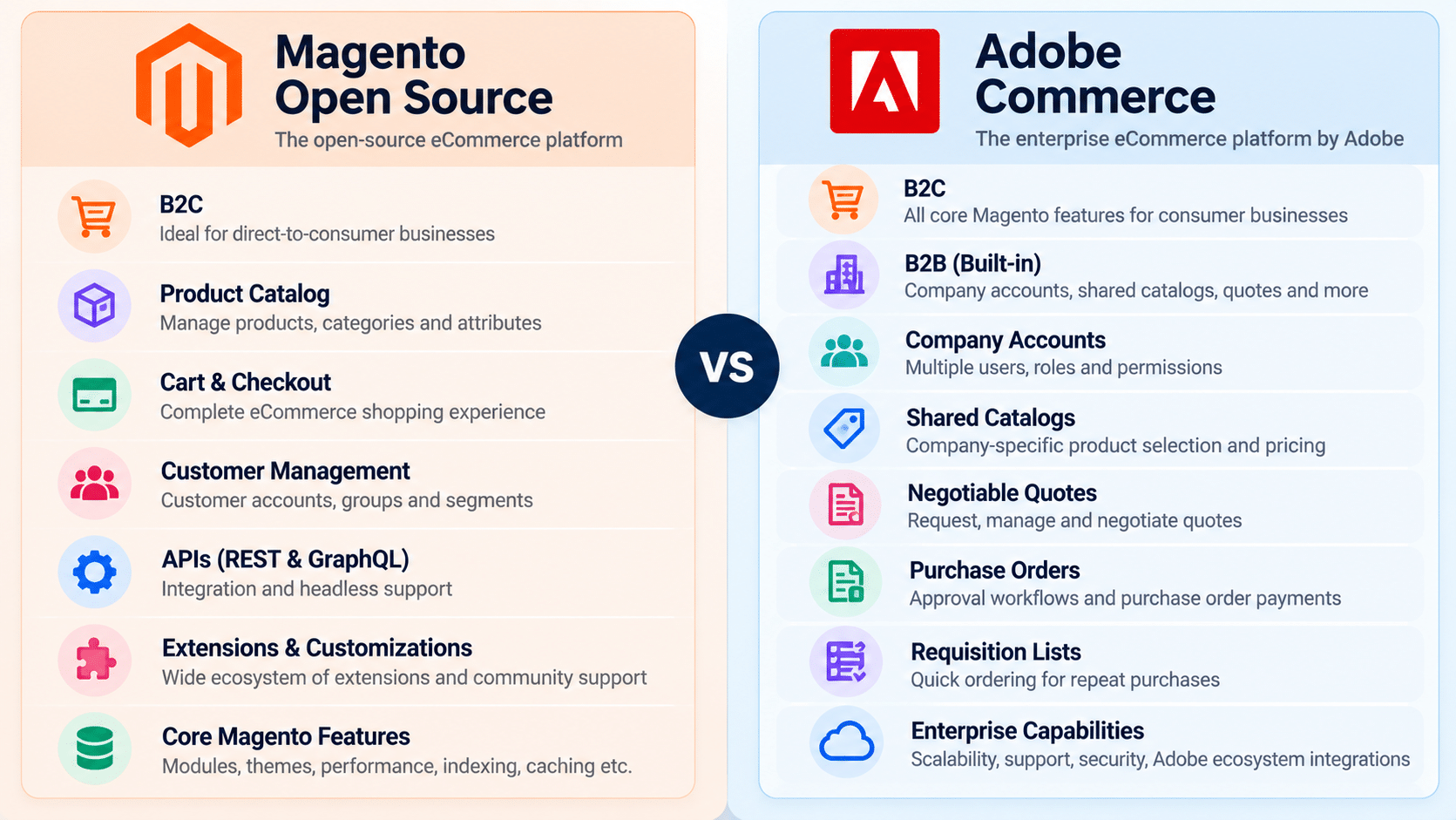
If you are coming from Magento Open Source, the easiest way to understand Adobe Commerce is to think about it as the commercial version of the Magento commerce platform with additional enterprise capabilities and services.
But I wouldn’t reduce the comparison to:
Magento Open Source = free
Adobe Commerce = paid
That’s too simplistic.
The real difference becomes clearer when you look at the business requirements.
For a straightforward B2C store, Magento Open Source may provide everything the business needs.
But imagine a company selling products to hundreds of businesses.
Now the requirements can become very different.
You may need:
- Company accounts
- Multiple buyers under one company
- Different roles and permissions
- Company-specific pricing
- Negotiated quotes
- Purchase approvals
- Credit limits
- Requisition lists
- Quick ordering
- Complex integrations
This is where Adobe Commerce starts becoming much more interesting.
Adobe Commerce B2B
If you’ve worked mostly with B2C Magento stores, B2B is one of the first areas I would spend time learning.
Because B2B is not simply “B2C with a different customer group.”
The buying process itself can be different.
Let’s take a simple example.
Imagine a company has 50 employees who can purchase products from your ecommerce website.
You don’t necessarily want all 50 users behaving like completely independent customers.
You may have:
Company
→ Sales Department
→ Procurement Department
→ Finance Department
→ Multiple buyers
→ Company administrator
And each user may have different permissions.
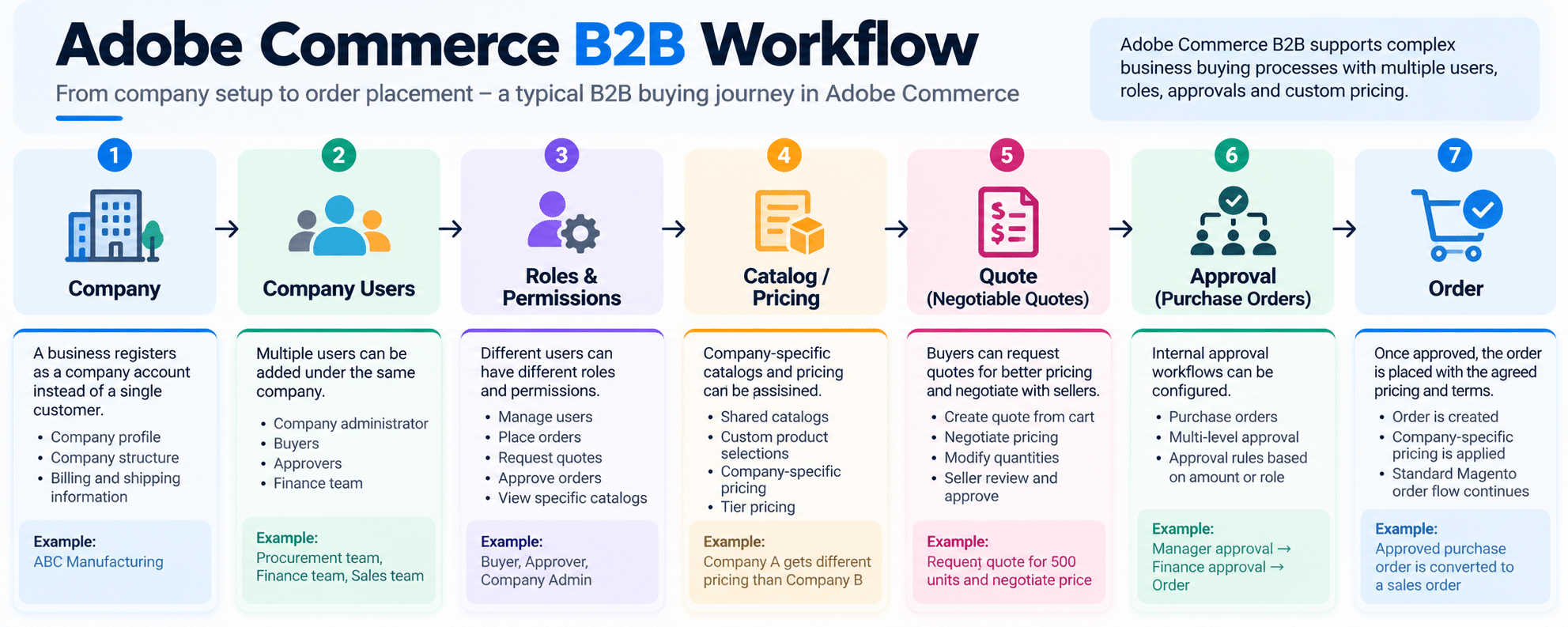
Adobe Commerce B2B provides functionality around this type of structure.
Company Accounts
The company account is one of the important building blocks.
Instead of thinking only about:
Customer → Order
you can have:
Company → Users → Roles → Orders
A company administrator can manage users and company structure, while permissions can determine what different users are allowed to do.
This becomes particularly important for organizations with multiple buyers and approval processes.
Shared Catalogs
Now let’s say Company A gets one price and Company B gets another price.
You don’t necessarily want to create completely different products or websites.
This is where Shared Catalogs become useful.
You can create company-specific product selections and pricing.
For example:
Standard catalog
Product A — $100
Company A
Product A — $90
Company B
Product A — $85
The catalog and pricing structure can therefore be different for different companies.
If you’ve worked with Magento pricing, you can probably already see how useful this can become.
Negotiable Quotes
This is another feature that makes sense immediately when you think about real B2B buying.
A buyer may say:
“We want 500 units. Can you give us a better price?”
Instead of the normal ecommerce flow:
Product → Cart → Checkout
you can have:
Product → Cart → Quote → Negotiation → Agreement → Order
Adobe Commerce provides Negotiable Quotes for this type of buyer/seller negotiation.
Purchase Orders
Now imagine the company has an internal approval process.
A buyer creates an order.
But the buyer isn’t allowed to place the final order without approval from someone else.
That’s where Purchase Order workflows become useful.
You can have different approval rules depending on the company’s requirements.
So again, the important thing isn’t just learning where the feature is in Admin.
As a developer, you should understand what business process the feature is solving.
Requisition Lists
Some B2B customers repeatedly order the same products.
Instead of searching for those products every time, they can maintain requisition lists and quickly add frequently purchased products to the cart.
For example:
Monthly Office Supplies
- Paper
- Toner
- Pens
- Packaging material
Every month, the buyer can use the list instead of rebuilding the order.
Adobe Commerce Cloud
Now let’s talk about Cloud.
And this is one area where I think Magento developers need to be careful because Adobe Commerce has more than one cloud model.
There is:
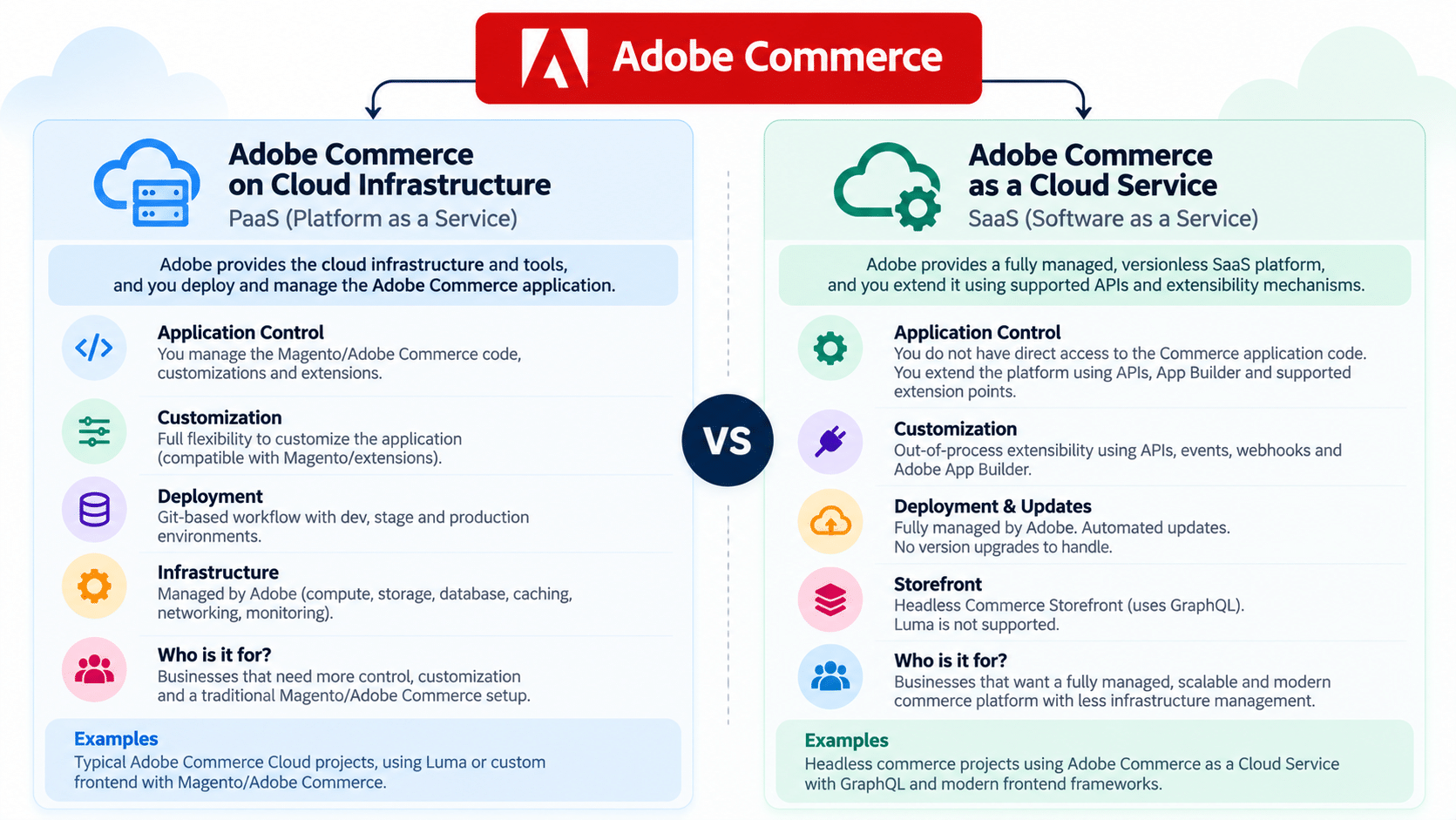
Adobe Commerce on Cloud Infrastructure
and
Adobe Commerce as a Cloud Service
These are not the same thing.
Adobe Commerce on Cloud Infrastructure
If you’ve worked with Adobe Commerce Cloud projects, this is probably the model you are more familiar with.
Adobe Commerce on Cloud Infrastructure is a PaaS-style environment where Adobe provides the cloud infrastructure and tooling around the Commerce application.
The project uses Git-based workflows, environments and deployment processes.
The underlying infrastructure includes services such as PHP, database, caching, message queues and supported search technologies.
From a developer’s point of view, this still feels much closer to the traditional Magento development model.
You have a Commerce application.
You have code.
You have configuration.
You have environments.
You deploy changes.
You work with modules and customizations.
So if you already know Magento development, there is a lot here that will feel familiar.
Adobe Commerce as a Cloud Service
Now this is where things change.
Adobe Commerce as a Cloud Service is a fully managed, versionless SaaS offering.
Adobe manages the core platform, infrastructure and updates, while developers extend the platform using supported APIs and extensibility mechanisms.
This is a very different mindset from maintaining a traditional Magento installation.
Instead of thinking:
“How do I modify the Commerce code?”
you increasingly start thinking:
“How do I extend Commerce without modifying the Commerce core?”
That’s a very important shift.
Adobe Commerce as a Cloud Service uses a more composable, API-first approach, with capabilities such as Commerce APIs, App Builder and other services around the platform.
And there is another important difference:
Adobe Commerce as a Cloud Service does not support the traditional Luma storefront. Its Commerce Storefront is headless and uses GraphQL APIs to interact with Commerce services.
So if you are a Magento developer today, I would definitely keep an eye on this model.
Adobe Commerce APIs
If you’ve been developing Magento for a while, REST APIs are probably nothing new.
Adobe Commerce continues to provide APIs for integrations and custom applications.
But GraphQL becomes particularly important when you start working with headless and modern storefront architectures.
The basic idea is simple.
Instead of your frontend being tightly coupled to the Commerce application, you can have:
Frontend
↓
GraphQL / APIs
↓
Commerce
This makes it possible to build different customer experiences while using Commerce as the underlying commerce engine.
And this is becoming increasingly important in modern Adobe Commerce architectures.
Events and Webhooks
Now this is another area I think Magento developers should understand.
Traditionally, when we wanted another system to know something happened in Magento, we might use APIs, observers, cron jobs or polling.
For example:
Order created
↓
Check Magento
↓
Send information to ERP
But event-driven architecture gives you another approach.
Something happens in Commerce.
↓
Commerce emits an event.
↓
Another application receives it.
↓
That application performs the required action.
Adobe’s I/O Events for Commerce can make Commerce transactional events available to applications built with Adobe App Builder. Adobe’s own example shows an order event being used to send information to an ERP system.
This is important because it moves some custom logic outside the Commerce application itself.
Adobe App Builder
Now let’s come to App Builder.
This is one of the areas where Magento developers may initially think:
“Is this just another Magento extension?”
No.
That’s not how I would think about it.
Adobe App Builder is an application development platform that can be used to build applications and integrations around Adobe products, including Commerce.
Adobe describes this as out-of-process extensibility.
In simple terms:
Instead of putting every piece of custom business logic directly inside the Commerce codebase, you can build an application outside Commerce and connect it through APIs, events, webhooks and extension points.
For example, imagine you want to add custom product validation.
A traditional approach might be:
Commerce
→ Custom module
→ Custom PHP logic
→ Database / APIs
With an out-of-process approach, the flow can look more like:
Commerce
↓
Webhook / Event
↓
App Builder
↓
Custom business logic
↓
Response / External system
Adobe provides examples of using App Builder with Commerce webhooks for exactly this kind of extension.
This doesn’t mean traditional Magento modules suddenly become irrelevant.
There are still many cases where normal Commerce customization makes sense.
But for developers working with newer Adobe Commerce architectures, understanding when to keep logic inside Commerce and when to move it outside is becoming increasingly important.
API Mesh
Now we get into another term that sounds complicated until you see the problem it solves.
Imagine you have:
Commerce API
ERP API
PIM API
Inventory API
Customer API
Your application might otherwise need to understand all of these different APIs.
API Mesh can bring multiple APIs together behind a unified GraphQL endpoint.
Adobe describes API Mesh as a way to combine APIs using protocols such as GraphQL, REST, JSON schemas and SOAP into a unified GraphQL endpoint.
So instead of thinking:
“I need to integrate five APIs.”
you can start thinking:
“I need one API layer that gives my application the data it needs.”
That’s the mental model I would keep.
Adobe I/O
Adobe I/O is another piece of the larger Adobe developer ecosystem.
For Commerce developers, one area that matters is Adobe I/O Events.
The interesting part is how it connects Commerce events with applications and services.
For example:
Customer places order
↓
Commerce event
↓
Adobe I/O Events
↓
App Builder
↓
ERP / CRM / another external system
This kind of event-driven integration is particularly useful when you don’t want your Commerce application to be responsible for every downstream process.
If you’re learning App Builder, I would learn the event flow along with it rather than learning App Builder in isolation.
Adobe Commerce Integrations
Of course, ecommerce doesn’t live by itself.
A real ecommerce business usually has several systems around Commerce.
For example:
Adobe Commerce
↓
ERP
CRM
PIM
OMS
Payment
Shipping
Tax
Customer service
Marketing systems
Analytics
And this is where APIs, events, webhooks and App Builder become useful.
Let’s take an example.
A customer places an order.
You may need:
Commerce
→ Create order
→ Send order to ERP
→ Update inventory
→ Send information to OMS
→ Trigger customer communication
→ Update analytics
→ Start fulfilment
The important skill for a modern Commerce developer is therefore not only:
“Can I write a Magento module?”
It is also:
“Can I understand the complete flow of data between these systems?”
That is a much more valuable skill when working on larger commerce implementations.
Adobe Commerce and Adobe Experience Cloud
Now we come to the wider Adobe ecosystem.
Adobe Commerce does not exist in isolation.
Adobe also has its broader Experience Cloud products and services.
For example, businesses may use Adobe technologies for:
- Analytics
- Content
- Personalization
- Customer data
- Digital asset management
- Marketing experiences
Commerce can connect with these capabilities.
But there is one distinction I want to make here.
Adobe Experience Cloud is not simply a collection of features inside Adobe Commerce.
Think of it as a larger Adobe ecosystem around the commerce platform.
For example:
Adobe Commerce
handles the commerce side.
Adobe Experience Manager
can handle content experiences.
Adobe Analytics
can help with analytics.
Adobe Target
can support personalization and testing.
And these systems can work together depending on the architecture and products a business is using.
Adobe’s current Cloud Service architecture documentation explicitly shows Commerce working with Adobe Experience Cloud solutions.
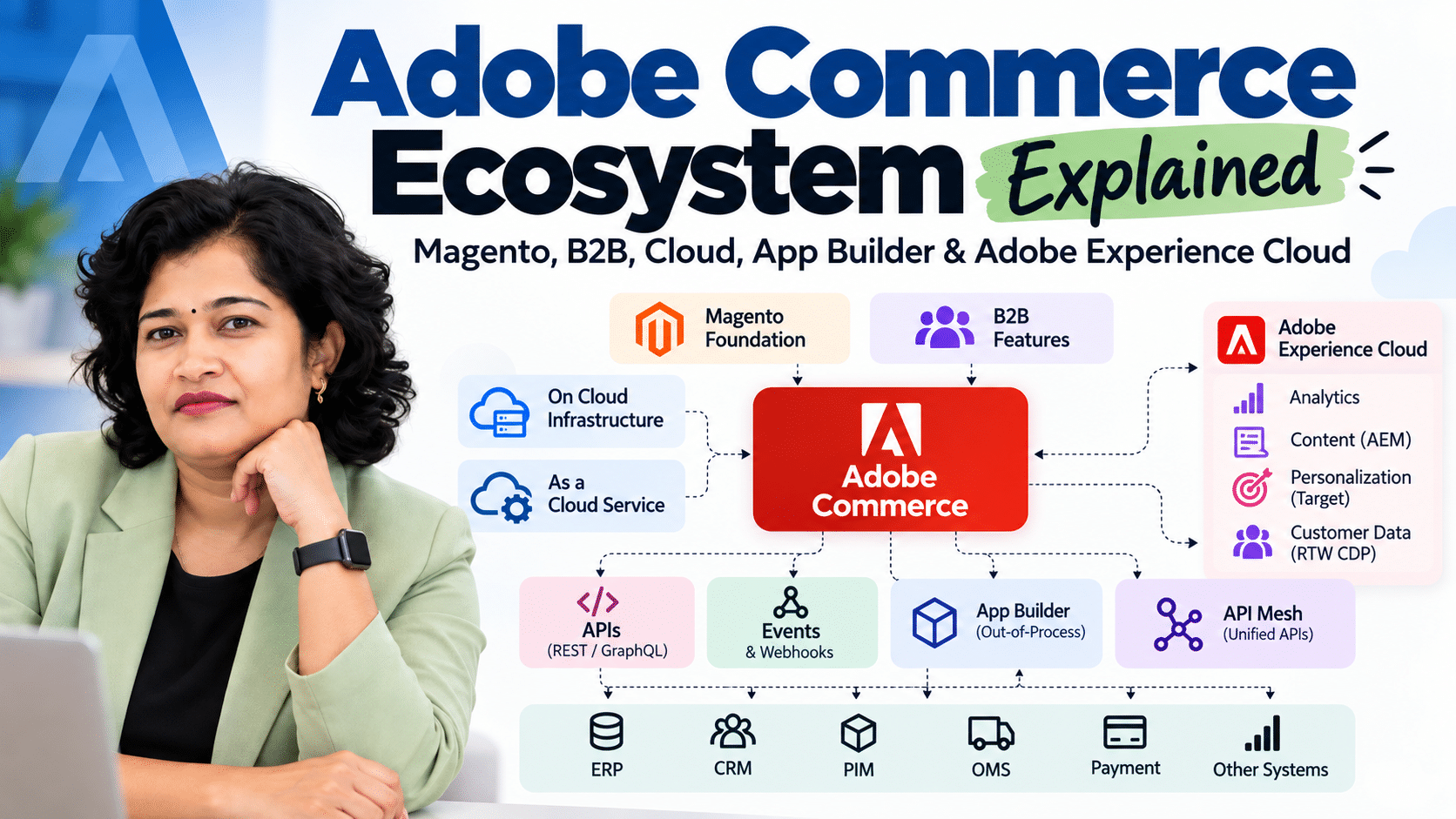
So What Does the Complete Adobe Commerce Ecosystem Look Like?
This is the mental model I would keep.
Think of Adobe Commerce as one part of a much larger architecture.
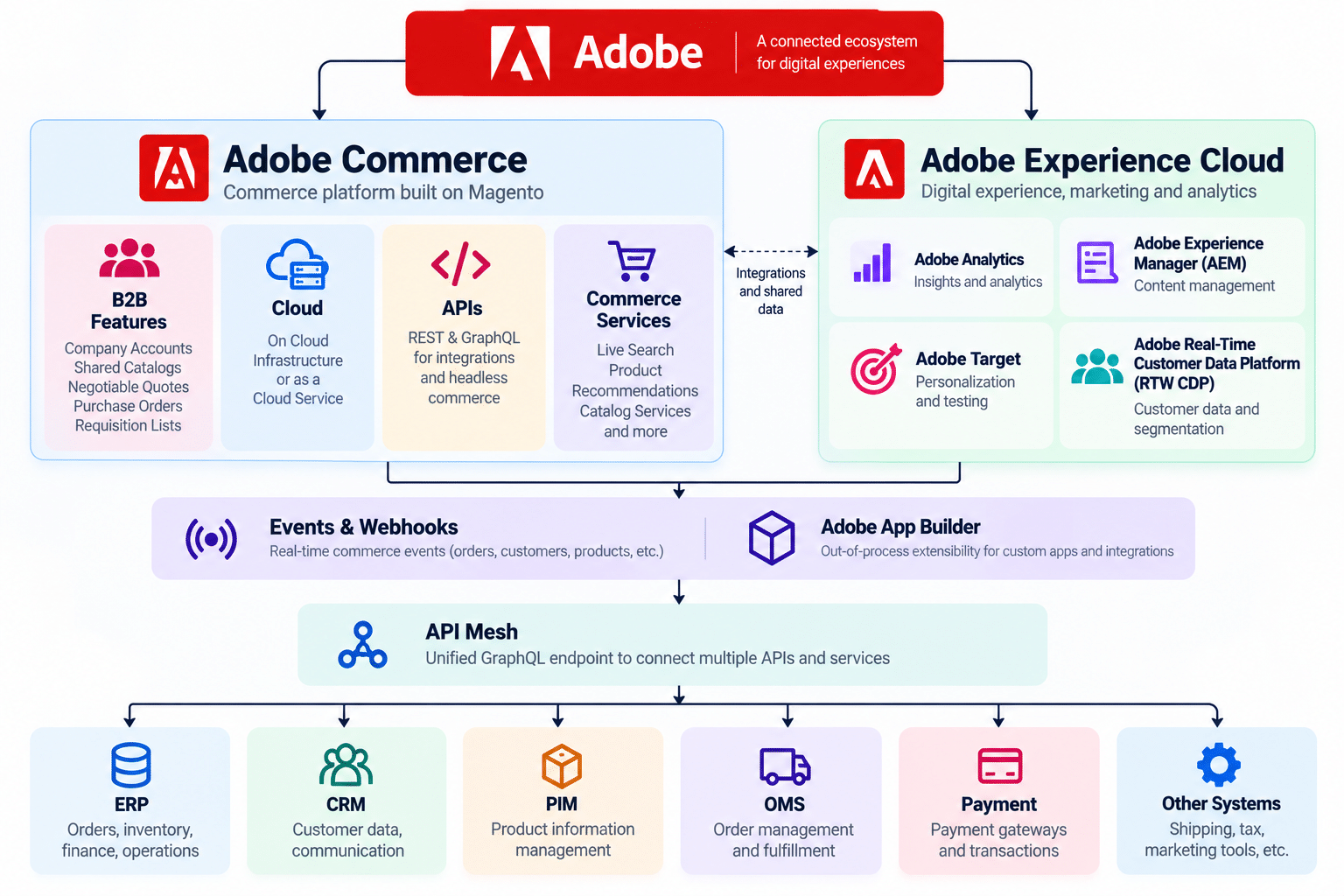
And then Cloud becomes another dimension:
Adobe Commerce
       |
       +-- On Cloud Infrastructure
       |
       +-- Adobe Commerce as a Cloud Service
The important thing is not memorizing this diagram.
The important thing is understanding how the pieces communicate.
What Should Magento Developers Learn Next?
If you’ve been working with Magento for several years, I don’t think you need to suddenly stop everything and learn every Adobe product.
I would build this knowledge step by step.
1. Understand Adobe Commerce
Start with the platform itself.
Understand what’s different from Magento Open Source and where the enterprise capabilities fit.
2. Learn B2B properly
Don’t just learn the Admin configuration.
Understand:
- Company hierarchy
- Roles
- Permissions
- Shared catalogs
- Negotiable quotes
- Purchase orders
- Requisition lists
- B2B workflows
This helps you understand the business side of B2B commerce.
3. Strengthen REST and GraphQL
If you’re already comfortable with REST, spend more time with GraphQL.
Especially if you want to work on headless or composable Commerce projects.
4. Understand Events and Webhooks
Learn how Commerce can communicate with external applications based on events rather than everything being handled synchronously inside the platform.
5. Learn App Builder
You don’t need to become an App Builder expert immediately.
Start with one simple integration.
Understand:
Commerce → Event → App Builder → External System
Once that flow makes sense, the rest becomes easier.
6. Learn API Mesh
Understand why you would put an API aggregation layer between your frontend and multiple backend services.
7. Learn the Cloud Service architecture
This is particularly important.
The development mindset for a traditional Magento/Adobe Commerce application and a versionless SaaS platform is not exactly the same.
The more you understand the supported extension points, APIs, events and out-of-process architecture, the easier it becomes to work with the newer model.
Final Thoughts
If you’ve been working with Magento for years, you already have a strong foundation for learning Adobe Commerce.
The bigger shift is not simply learning new Admin features.
It’s understanding how modern Commerce applications are being built.
You need to be comfortable with:
Commerce + APIs + Events + Cloud + External Systems + Out-of-Process Extensibility
And then, depending on the project, you may also need to understand how Commerce fits with the wider Adobe Experience Cloud.
For me, that’s the easiest way to look at the Adobe Commerce ecosystem.
Don’t think of it as one huge product that you need to learn from beginning to end.
Think of it as a set of pieces.
You already know some of them.
Now learn how the pieces connect.
And if you’re a Magento developer planning to move deeper into Adobe Commerce, this is the direction I would start learning today.