
No products in the cart.

- Published: Aug 30, 2026 | Updated: Aug 30, 2026

Magento 2 SEO: Complete Guide to SEO & Optimization
Table of Contents
Magento 2 provides a strong foundation for ecommerce SEO, but a Magento store is not automatically SEO-friendly simply because the platform includes SEO settings.
The real challenge is understanding how Magento’s catalog, URLs, navigation, indexing signals, content and frontend architecture work together.
A small catalog may have hundreds of URLs.
A large Magento store can have tens of thousands—or far more—through products, categories, filters, sorting, pagination, URL rewrites and other catalog functionality.
That changes the SEO problem.
The goal isn’t to make every URL rank.
The goal is to make sure search engines can discover, understand and prioritize the pages that deserve organic visibility.
This guide explains how to approach Magento 2 SEO from that perspective.
Magento 2 SEO at a glance
Magento 2 SEO isn’t a single configuration setting. It is the interaction between technical SEO, ecommerce architecture, content, crawlability and performance.
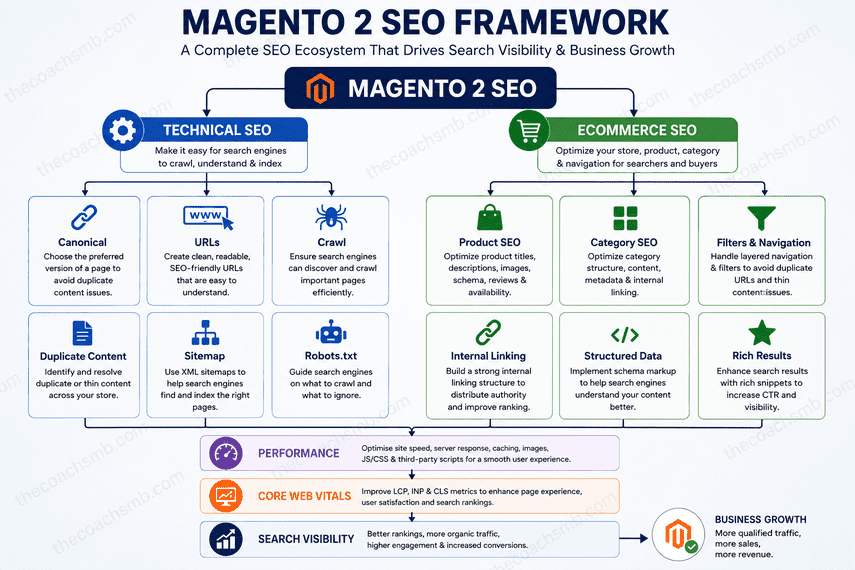
The following framework shows how these areas connect—from URLs, canonicals and crawlability through product and category SEO, layered navigation and performance.
Magento SEO can be viewed as several connected layers:
Technical SEO
- Canonical URLs
- URL structure
- URL rewrites
- Crawlability
- Duplicate content
- XML sitemaps
- Robots.txt
Ecommerce SEO
- Product SEO
- Category SEO
- Layered navigation
- Filters
- Internal linking
- Structured data
Performance
- Page speed
- JavaScript
- Images
- Caching
- Core Web Vitals
- Third-party scripts
These areas ultimately contribute to search visibility, but they shouldn’t be treated as isolated checkboxes.
A canonical problem can be caused by URL architecture.
A crawl problem can be caused by layered navigation.
A performance problem can be caused by an extension.
A sudden ranking loss can be caused by a URL change.
Magento SEO is therefore a system, not a collection of settings.
1. What is Magento 2 SEO?
Magento 2 SEO is the process of optimizing a Magento store so search engines can:
- Discover important pages.
- Crawl them efficiently.
- Understand their content.
- Identify the preferred version of each URL.
- Index valuable pages.
- Match those pages with relevant searches.
- Send qualified organic traffic to the store.
This includes conventional SEO activities such as:
- title tags
- meta descriptions
- headings
- content
- images
- internal links
But Magento introduces another layer:
The ecommerce platform itself influences the SEO architecture.
Consider a category:
/women/shoes/
A customer might filter it by:
- brand
- color
- size
- material
- price
The resulting URL space can become much larger:
/women/shoes/

/women/shoes/?brand=nike

/women/shoes/?brand=nike&color=black

/women/shoes/?brand=nike&color=black&size=42
The important question isn’t simply:
Can Google access these URLs?
The better question is:
Which of these URLs should actually exist as search-engine landing pages?
That distinction is fundamental to Magento SEO.
2. Magento 2 SEO settings
Magento includes native functionality for many important SEO requirements.
Depending on the Magento edition, version and storefront implementation, this includes functionality around:
- metadata
- URL rewrites
- canonical URLs
- product and category URLs
- XML sitemaps
- robots.txt
- product/category SEO configuration
Adobe’s current documentation identifies metadata, sitemaps, URL rewrites and search-engine robots as core SEO capabilities within Commerce.
But there is an important principle:
A Magento SEO setting should be configured according to the site’s architecture—not simply enabled because it exists.
This becomes especially important on large catalogs and multi-store installations.
3. Magento 2 product SEO
Product pages are usually among the most commercially valuable pages on an ecommerce site.
A technically sound product SEO implementation should consider:
- Product name
- URL key
- Meta title
- Meta description
- H1
- Product description
- Images
- Alt text
- Structured data
- Price
- Availability
- Reviews
- Breadcrumbs
- Internal links
- Related products
Magento’s product configuration provides SEO fields including the URL key and metadata, and supports auto-generation of metadata from configured values.
But scale changes the problem.
Imagine two stores.
Store A
500 products.
Manual optimization may be practical.
Store B
100,000 products.
You need a systematic approach.
That may involve:
- metadata templates
- attribute-driven content
- product data quality
- manufacturer information
- product lifecycle rules
- out-of-stock handling
- canonicalization
- structured data
- internal linking
But there is a trap here.
Automation does not automatically mean optimization.
A template can produce a unique title for every product while still producing poor titles.
For example:
Product Name | Buy Online | Free Shipping
might be technically unique across 100,000 products.
It doesn’t necessarily mean those titles are useful for searchers.
The objective is not simply:
Unique metadata.
The objective is:
Useful, relevant metadata at scale.
4. Magento 2 category SEO
Category pages are often some of the most valuable SEO assets on an ecommerce store.
A category can target broader commercial intent than an individual product.
For example:
Running Shoes
       ↓
Men's Running Shoes
       ↓
Trail Running Shoes
       ↓
Waterproof Trail Running Shoes
This hierarchy can help both users and search engines understand the relationship between products and categories.
Magento provides category-level SEO controls for elements such as URL keys and metadata.
But don’t make the mistake of creating hundreds of categories simply because each one could theoretically rank.
A useful SEO category should have a reason to exist.
Consider:
- Does it represent a distinct product group?
- Is there meaningful search intent?
- Does it contain enough useful products?
- Does it provide a better experience?
- Does it deserve internal links?
- Is the content meaningfully different from adjacent categories?
More indexed pages does not automatically mean more organic visibility.
The goal is quality and relevance of indexed pages, not the largest possible index.
5. Magento 2 URL structure and URL rewrites
URLs are particularly important in Magento because the catalog can change frequently.
Products can be:
- renamed
- moved
- discontinued
- merged
- reassigned
- migrated
- reorganized
Categories can change as well.
Magento’s URL Rewrite functionality allows product, category and CMS URLs to be changed.
Magento can also be configured to create permanent redirects when product or category URL keys change.
This is useful—but it shouldn’t encourage careless URL changes.
Consider:
Old URL
   ↓
301 redirect
   ↓
New URL
That transition affects much more than the browser.
It can affect:
- organic rankings
- backlinks
- internal links
- cached references
- analytics
- historical search visibility
And on large catalogs, URL rewrite management can itself become a technical consideration. Adobe specifically notes that automatic rewrite generation can create significant performance issues for categories with many assigned products under certain configurations.
SEO should therefore be part of catalog architecture decisions—not something checked after the migration.
6. Magento 2 canonical URLs
Canonicalization tells search engines which URL should be considered the preferred version when multiple URLs represent the same or substantially similar content.
This matters because Magento can expose products through different URL structures.
For example, depending on configuration, a product may be accessible through a category path as well as a direct product URL.
Adobe documents canonical controls for both categories and products and explains how they can be used to establish the preferred URL format.
But remember:
A canonical tag is a signal, not a magic fix.
If a site has:
- conflicting canonicals
- inconsistent internal links
- incorrect redirects
- duplicate URLs
- contradictory robots directives
- poor sitemap signals
adding a canonical tag alone doesn’t solve the architectural problem.
When investigating canonicalization, look at the whole signal set.
Ask:
- What URL does the user reach?
- What URL is internally linked?
- What URL is in the sitemap?
- What URL does the page declare as canonical?
- Does the canonical return 200?
- Does the redirected URL point somewhere else?
- What URL does Google actually select?
That is a much more reliable way to diagnose canonical problems.
7. Magento 2 duplicate content
Duplicate content is particularly interesting in ecommerce because it can be generated by functionality rather than editorial mistakes.
Common sources can include:
- layered navigation
- sorting
- URL parameters
- product/category paths
- configurable products
- URL rewrites
- duplicate CMS pages
- legacy URLs
- alternate URL formats
For example:
/category/product.html

/category/subcategory/product.html

/product.html
If several URLs represent the same underlying product, the issue isn’t simply that there are multiple URLs.
The real question is:
Which URL should be the authoritative version?
Possible solutions may include:
- canonicalization
- redirects
- controlling URL generation
- internal-link correction
- indexation controls
The correct solution depends on the underlying cause.
8. Magento 2 layered navigation and filter SEO
This is one of the most important areas of Magento SEO.
Layered navigation is excellent for ecommerce UX.
Customers want to narrow a catalog by:
- brand
- color
- size
- price
- material
- availability
- specifications
But every filter combination can potentially create another URL.
For a large catalog:
Category
   ↓
Brand
   ↓
Color
   ↓
Size
   ↓
Material
   ↓
Price
The number of possible combinations can grow rapidly.
That creates a fundamental SEO question:
Which filtered pages have enough value to deserve search visibility?
The answer isn’t necessarily:
Index everything.
Nor is it necessarily:
Block everything.
A better model is:
Valuable search landing page
A filter combination has genuine search intent and unique commercial value.
→ Consider treating it as an intentional SEO landing page.
Useful navigation page
The filter is valuable to customers but doesn’t need organic visibility.
→ Keep it useful for users while controlling its search treatment appropriately.
Low-value URL combination
The combination exists because the technology permits it, not because anyone needs to search for it.
→ Control unnecessary crawl/indexation.
This is where ecommerce SEO becomes an architecture problem rather than a metadata problem.
9. Magento 2 robots.txt
Magento provides functionality for managing search-engine robot instructions. Adobe documents both the default behavior and custom robots configuration.
But robots.txt is frequently misunderstood.
Crawling and indexing are not the same thing.
A robots directive primarily controls whether a crawler is allowed to request a URL.
It should not be treated as a universal:
“Remove this URL from Google.”
When diagnosing an indexation issue, first determine what the actual problem is.
Ask:
- Should this URL exist?
- Should search engines crawl it?
- Should it be indexable?
- Should another URL be canonical?
- Should it redirect?
- Should it disappear?
Those are different decisions.
A useful mental model is:
URL problem
    │
    ├── Wrong URL → Redirect
    │
    ├── Duplicate → Canonical / architecture
    │
    ├── Low-value indexable page → Indexation control
    │
    └── Unnecessary crawl → Crawl control
Don’t use robots.txt as a substitute for understanding the problem.
10. Magento 2 XML sitemap
An XML sitemap helps search engines discover pages that you want them to find.
Magento supports sitemap generation and configuration, including content types, update frequency and sitemap file limits. Adobe currently documents a default maximum of 50,000 URLs per sitemap file, with configurable file-size limits.
But a sitemap should not become a dump of every URL Magento can generate.
Think of the sitemap as a statement:
“These are the URLs we consider important and want search engines to discover.”
That means you should be careful about including:
- redirected URLs
- duplicate URLs
- non-canonical URLs
- obsolete products
- pages you don’t want indexed
A technically valid sitemap can still communicate poor SEO signals.
Sitemap quality matters more than sitemap existence.
And remember:
Being included in a sitemap does not guarantee indexation.
It is one discovery signal among many.
11. Magento 2 structured data
Structured data helps search engines interpret information about products and other entities.
For ecommerce, relevant information may include:
- product identity
- price
- currency
- availability
- brand
- SKU
- reviews
- ratings
But structured data should describe information that actually exists on the page.
Don’t add schema simply because a checklist says:
“Add Product schema.”
The implementation needs to be accurate and consistent with the visible page.
And after implementing or modifying structured data, validate it.
The objective isn’t:
“We have schema.”
The objective is:
“Search engines can reliably understand the information represented by the schema.”
12. Magento 2 internal linking
Internal linking is one of the simplest and most overlooked parts of ecommerce SEO.
A basic Magento structure may look like:
Home
  ↓
Category
  ↓
Subcategory
  ↓
Product
But good ecommerce architecture can create many useful relationships:
Category
 ├── Subcategory
 ├── Brand
 ├── Related products
 ├── Buying guides
 └── Supporting content
Internal links help users navigate.
They also help search engines understand:
- which pages are important
- how products relate to categories
- how categories relate to broader topics
- which content supports which commercial pages
One useful question during an audit is:
Can an important page be reached through meaningful internal links, or does it exist primarily because Magento generated it?
That question often reveals architectural weaknesses.
13. Magento 2 performance and SEO
Performance shouldn’t be treated as a completely separate discipline from SEO.
A Magento store is a system.
Magento architecture
        ↓
Server response
        ↓
HTML
        ↓
CSS / JavaScript
        ↓
Rendering
        ↓
User interaction
        ↓
Conversion
Performance problems can originate from:
- theme implementation
- extensions
- JavaScript
- third-party scripts
- images
- API calls
- caching
- server configuration
- database workload
Core Web Vitals add another useful lens for understanding user experience, including:
- LCP — loading performance
- INP — interaction responsiveness
- CLS — visual stability
But don’t reduce Magento performance optimization to:
“Get a green PageSpeed score.”
A score is a diagnostic signal.
It isn’t the business objective.
A Magento store can improve a synthetic score while introducing trade-offs that affect:
- merchandising
- analytics
- personalization
- functionality
- conversion
The right question is:
What is making this particular store slow, and what is the business impact of fixing it?
14. Magento 2 SEO extensions: do you need one?
There are many Magento SEO extensions covering capabilities such as:
- metadata automation
- layered navigation
- rich snippets
- redirects
- URL management
- cross-linking
My recommendation is straightforward:
Don’t install an SEO extension until you understand the problem you’re trying to solve.
Ask:
Can Magento already handle it?
Use the native functionality where it is sufficient.
Does the business need behavior that requires customization?
Evaluate a maintainable customization.
Is there a genuine capability gap?
Then evaluate an extension.
Every extension becomes another part of the Magento ecosystem that needs to be considered during:
- upgrades
- compatibility testing
- performance analysis
- security reviews
- debugging
The number of SEO extensions installed is not a measure of how well optimized a Magento store is.
15. How to audit Magento 2 SEO
A good Magento SEO audit shouldn’t start with:
“Let’s find as many errors as possible.”
It should start with:
“Which problems could prevent important pages from receiving organic visibility?”
I recommend working through seven layers.
Layer 1 — Crawlability
Can search engines discover the important pages?
Check:
- robots.txt
- XML sitemap
- internal links
- status codes
- URL parameters
- crawl paths
Layer 2 — Indexability
Are the right pages eligible for indexing?
Check:
- robots directives
- noindex
- canonical signals
- duplicate URLs
- thin pages
Layer 3 — Canonicalization
Does each important page have a clear preferred URL?
Check:
- products
- categories
- filters
- parameters
- pagination
- redirects
Layer 4 — Architecture
Does the catalog structure make sense?
Check:
- category hierarchy
- product relationships
- navigation
- filters
- breadcrumbs
- internal links
Layer 5 — Relevance
Does the page satisfy a meaningful search intent?
Check:
- title
- H1
- content
- product information
- category content
- structured data
Layer 6 — Performance
Where is the actual performance bottleneck?
Check:
- server response
- frontend rendering
- JavaScript
- images
- caching
- extensions
- third-party scripts
- Core Web Vitals
Layer 7 — Search performance
Finally, compare technical findings with real search data.
Review:
- impressions
- clicks
- CTR
- landing pages
- queries
- conversions
- organic revenue
This is important because:
An SEO audit isn’t successful because you found 300 issues. It’s successful because you identified the issues that matter.
16. A practical Magento 2 SEO checklist
Technical SEO
- HTTPS configured correctly
- Preferred domain established
- URL rewrites reviewed
- Redirects reviewed
- Canonical strategy defined
- Duplicate URLs identified
- Robots.txt reviewed
- XML sitemap reviewed
- Important pages crawlable
- Unnecessary URL combinations controlled
Product SEO
- Product titles are useful and unique
- Product descriptions provide real value
- URL keys are clean
- Metadata is appropriate
- Images are optimized
- Alt text is meaningful
- Structured data is accurate
- Availability is represented correctly
- Internal links exist
Category SEO
- Logical hierarchy
- Clear search intent
- Unique metadata
- Useful category content
- Appropriate canonicalization
- Pagination considered
- Strong internal linking
Layered navigation
- Filter URL strategy defined
- Search-worthy filters identified
- Low-value combinations controlled
- Canonical/indexation signals consistent
- Crawl behavior reviewed
Performance
- LCP reviewed
- INP reviewed
- CLS reviewed
- Images optimized
- JavaScript reviewed
- Third-party scripts reviewed
- Caching reviewed
- Server performance reviewed
Measurement
- Google Search Console configured
- Sitemap submitted
- Organic landing pages monitored
- Search queries monitored
- Organic conversions measured
- Organic revenue measured
17. Common Magento 2 SEO mistakes
Mistake 1: Trying to index everything
A larger index isn’t automatically a better index.
Mistake 2: Treating canonical tags as a universal duplicate-content solution
Canonicalization is one part of a broader URL strategy.
Mistake 3: Using robots.txt to solve every indexation problem
Crawling and indexation require different decisions.
Mistake 4: Allowing layered navigation to create uncontrolled URL combinations
This can become a significant architectural problem on large catalogs.
Mistake 5: Changing URLs without considering redirects
A catalog restructure can become an SEO migration.
Mistake 6: Installing extensions before diagnosing the problem
Technology should solve a known problem—not create another dependency.
Mistake 7: Optimizing metadata while ignoring architecture
A perfect title tag cannot compensate for a poor URL and navigation structure.
Mistake 8: Chasing performance scores rather than performance problems
Optimize the actual bottleneck and its impact.
Mistake 9: Measuring rankings instead of business outcomes
Rankings are useful indicators.
They are not the final objective.
18. The most important Magento SEO principle
Magento SEO is often approached as something that happens after the ecommerce platform has been built.
That’s too late.
SEO affects:
catalog architecture → URL architecture → navigation → content → frontend → performance → integrations → analytics
A ranking problem might appear to be an SEO issue while the underlying cause is somewhere else.
For example:
Ranking decline
      ↓
Investigate
      ↓
URL change?
Canonical?
Filter architecture?
Internal linking?
Indexation?
Performance?
Migration?
Extension?
Content?
The visible symptom doesn’t necessarily identify the underlying cause.
That is why strong Magento SEO work requires understanding the commerce system, not just the SEO settings.
Final thoughts
Magento 2 gives ecommerce businesses a powerful platform for building search-friendly stores.
But the platform doesn’t make the SEO decisions for you.
You still need to decide:
- Which pages deserve to exist?
- Which pages should be crawled?
- Which pages should be indexed?
- Which URL is canonical?
- How should products and categories relate?
- How should filters behave?
- How should URL changes be handled?
- How should performance be managed?
- How should organic performance be measured?
The strongest Magento SEO implementations don’t try to make everything visible.
They create a clear architecture where:
the right pages are discoverable,
the right pages are indexable,
the right pages are relevant,
the technical signals are consistent,
and
the resulting organic visibility supports the ecommerce business.
Magento SEO is ultimately not about optimizing every URL. It’s about designing the system so search engines can understand which URLs matter.