
No products in the cart.

- Published: Aug 11, 2026 | Updated: Aug 31, 2026

Magento 2 Speed Optimization: 10 Proven Ways to Improve Performance & Core Web Vitals
Table of Contents
A slow Magento store is rarely caused by one setting.
On an ecommerce site, performance is the result of several layers working together:
Browser → JavaScript/CSS → Theme → Magento application → Extensions → Database → Cache → Web server → Hosting infrastructure
That is why simply enabling cache or compressing a few images rarely solves a serious Magento performance problem.
For an ecommerce business, the objective is not just to make a PageSpeed score look better.
The real objective is to build a store that:
- loads important content quickly
- responds quickly to customer interactions
- remains stable while loading
- handles traffic and catalog growth
- provides a good mobile experience
- doesn’t sacrifice functionality for an artificial performance score
This is where Magento 2 speed optimization and Core Web Vitals optimization become important.
What makes Magento 2 performance different?
Magento is considerably more complex than a simple content website.
A typical ecommerce request can involve:
- catalog and product attributes
- pricing
- inventory
- customer/session data
- configurable products
- promotions
- third-party extensions
- search
- layered navigation
- personalization
- payment integrations
- shipping calculations
- analytics and marketing scripts
As a result, a Magento store can be slow for very different reasons.
For example:
A slow server response is not fixed by compressing images.
Excessive JavaScript is not fixed by upgrading hosting.
A poorly optimized extension is not fixed by enabling browser caching.
A large database or inefficient query is not necessarily a frontend problem.
The first step in Magento performance optimization should therefore be diagnosis, not blindly changing settings.
Core Web Vitals and Magento 2
Performance also needs to be evaluated from the perspective of the customer.
Google’s current Core Web Vitals are:
LCP — Largest Contentful Paint
Measures loading performance.
A good LCP is 2.5 seconds or less at the 75th percentile.
For ecommerce, LCP is often influenced by:
- slow server response
- large hero images
- render-blocking resources
- slow CSS delivery
- CDN configuration
- frontend rendering
INP — Interaction to Next Paint
Measures how responsive a page is when users interact with it.
A good INP is 200 ms or less at the 75th percentile.
This is particularly relevant to Magento because ecommerce pages can contain substantial JavaScript.
Think about interactions such as:
- opening navigation
- changing configurable-product options
- applying filters
- opening mini-cart
- adding products to cart
- changing quantities
- interacting with checkout fields
CLS — Cumulative Layout Shift
Measures unexpected movement of page content.
A good CLS is 0.1 or less at the 75th percentile.
Typical ecommerce causes include:
- images without reserved dimensions
- dynamically injected banners
- late-loading fonts
- promotional elements
- cookie notices
- dynamically loaded content
Core Web Vitals should be evaluated using real-user/field data where available. Lab tools are valuable for diagnosing problems, but they do not replace field measurements.
Why Is Your Magento 2 Store Slow?
A Magento 2 store can be slow for very different reasons.
Before changing hosting, enabling another cache layer, installing a performance extension, or optimizing JavaScript, it is important to identify where the delay is actually occurring.
A useful starting point is to look at the symptom.
| What you’re seeing | Where I would investigate first |
|---|---|
| High TTFB | Server, PHP, database, cache |
| Homepage is fast but category pages are slow | Indexing, search, category processing |
| First visit is slow but reload is fast | Cache / cache warming |
| Admin is slow while the storefront is relatively fast | Database, PHP, extensions, cron |
| Page appears quickly but interactions lag | JavaScript / frontend |
| Images dominate page weight | Image delivery / image optimization |
| Content moves while loading | CLS / layout stability |
| Filtering is slow | OpenSearch, layered navigation, extensions |
| Checkout is slow | JavaScript, integrations, payment/shipping, backend |
These are starting points for investigation, not automatic diagnoses.
For example, high TTFB can indicate a server, PHP, database or caching problem, but you should measure the individual components before deciding what needs to be changed.
Likewise, slow filtering doesn’t automatically mean OpenSearch is the problem. Layered navigation, extensions, frontend requests, database operations or the interaction between several components may be involved.
The symptom tells you where to look. Measurement tells you what to fix.
How to Measure Before Changing Anything
Before making performance changes, establish a baseline.
At minimum, measure:
- TTFB
- LCP
- INP
- CLS
- FCP
- Total page weight
- JavaScript execution
- Number of requests
And don’t test only the homepage.
Magento performance can vary significantly between page types, so test:
- Homepage
- Category page
- Product page
- Search results
- Cart
- Checkout
A homepage can be fast because it is heavily cached while a category page may have significantly different processing requirements.
Similarly, a product page may have excellent loading performance but poor interaction responsiveness because of configurable-product logic, reviews, personalization or third-party JavaScript.
Test the page where the problem actually occurs.
1. Start with the hosting and server architecture
You cannot consistently build a fast Magento store on infrastructure that cannot support its workload.
Hosting affects:
- server response time
- database performance
- PHP processing
- concurrent requests
- cache performance
- disk I/O
- network latency
- scalability during traffic spikes
For production Magento environments, Adobe’s current performance guidance includes a stack built around PHP, Nginx/PHP-FPM, MySQL and Elasticsearch/OpenSearch, with Varnish and Redis recommended in appropriate scalable architectures.
But “buy a faster server” is not a performance strategy.
Before increasing infrastructure costs, measure where the bottleneck actually exists.
Look at:
- TTFB
- CPU utilization
- memory
- PHP workers
- database load
- slow queries
- cache hit rate
- concurrent traffic
- disk performance
If TTFB is consistently high, investigate the backend before spending time optimizing frontend assets.
2. Keep Magento and its dependencies current
Running an old Magento version can create both security and performance problems.
Newer releases can contain improvements to:
- application behavior
- indexing
- caching
- frontend functionality
- PHP compatibility
- security
- third-party dependency compatibility
However, upgrading Magento should not be treated as:
“Install the latest version and performance will automatically improve.”
A production upgrade needs regression testing.
Pay particular attention to:
- custom modules
- payment methods
- shipping integrations
- checkout customization
- theme compatibility
- search
- indexing
- cron jobs
- third-party extensions
The goal is a supported, maintainable Magento installation, not simply a higher version number.
3. Use Production Mode correctly
Magento’s application modes matter.
For a live ecommerce store, Production Mode is designed for production deployment and improves performance by ensuring static view files are deployed rather than generated on demand. Adobe explicitly recommends production mode for production systems.
You can check the current mode with:
bin/magento deploy:mode:showA production deployment should also include appropriate compilation and static-content deployment. Adobe’s current deployment guidance covers dependency compilation, static content deployment, indexing, cache flushing and cache warming as part of the production deployment process.
4. Configure Magento caching properly
Caching is fundamental to Magento performance.
A well-configured store should make effective use of:
- Magento application cache
- full-page cache
- browser caching
- CDN caching where appropriate
- Varnish where appropriate
- Redis for appropriate cache/session workloads
But remember:
Caching does not make inefficient application code efficient.
If a page is slow when the cache is cold, or important requests bypass the cache, you need to investigate the underlying application.
Also monitor cache invalidation.
A cache that is constantly being invalidated may provide far less benefit than expected.
5. Don’t enable Flat Catalog as a speed optimization
This is one place where the original article needs a significant correction.
Older Magento tutorials frequently recommended:
Use Flat Catalog Category → Yes
Use Flat Catalog Product → Yes
That advice should not be carried into a modern Magento 2 guide.
Adobe’s current documentation states that Flat Catalog is no longer recommended as a best practice and that its continued use is known to cause performance degradation and indexing issues in affected Magento/Adobe Commerce versions.
So if you encounter an old article recommending Flat Catalog as a Magento speed optimization, check the Magento version and current Adobe guidance before applying it.
This is exactly the type of outdated advice that can make an SEO/performance article lose credibility.
6. Audit third-party extensions
Third-party extensions are one of the most common sources of Magento complexity.
An extension can add:
- PHP processing
- database queries
- observers/plugins
- JavaScript
- CSS
- AJAX requests
- API calls
- cron jobs
- additional indexing operations
The problem isn’t simply the number of extensions.
One poorly implemented extension can cause more performance damage than several lightweight modules.
When investigating an extension, ask:
- What does it load?
- On which pages?
- Does it add frontend JavaScript?
- Does it modify database queries?
- Does it add observers/plugins?
- Does it introduce additional API calls?
- Does it affect checkout?
- Does it create unnecessary cron/indexing activity?
Don’t simply disable extensions randomly on production.
Use a staging environment and measure the before/after impact.
7. Optimize JavaScript and frontend assets
Modern Magento stores can load a significant amount of JavaScript.
The goal isn’t:
“Remove as much JavaScript as possible.”
The goal is:
“Load the JavaScript that the customer needs, when the customer needs it.”
Investigate:
- unused JavaScript
- third-party scripts
- tag managers
- chat widgets
- analytics
- personalization tools
- review widgets
- marketing pixels
- extension-generated JS
- unnecessary page-specific assets
Magento’s frontend uses RequireJS for JavaScript module loading, and Adobe provides configuration options for JavaScript bundling and exclusions.
Importantly, JavaScript bundling isn’t universally good or bad. Adobe’s current documentation explains that bundling can reduce requests but can also create larger bundles that block rendering; the correct configuration depends on the storefront and theme.
So I would remove the original blanket statement:
“Never Use JS Bundling.”
That’s too absolute for a modern authoritative guide.
Instead:
Measure it. Test it. Configure it according to the storefront.
8. Optimize images without damaging product quality
Images are particularly important for ecommerce.
Product and category pages can contain:
- product images
- thumbnails
- banners
- lifestyle images
- promotional graphics
- icons
Poor image handling can significantly increase page weight.
Review:
- image dimensions
- compression
- responsive images
- modern formats
- lazy loading
- image CDN
- thumbnails
- hero image priority
But don’t lazy-load the image that is responsible for LCP simply because an optimization plugin recommends lazy loading everything.
The largest above-the-fold image often needs to be available early.
Performance optimization is about loading the right resources at the right time, not applying the same rule to every asset.
9. Improve database, indexing and backend performance
Frontend optimization gets most of the attention, but Magento backend performance can be equally important.
Look at:
- slow database queries
- oversized tables
- inefficient custom modules
- indexer configuration
- cron jobs
- catalog complexity
- unnecessary data processing
- database growth
Adobe currently recommends Update on Schedule for indexers in performance-sensitive environments because it allows indexing to occur in the background through cron rather than immediately during catalog changes.
For larger Magento stores, indexing itself can become a significant performance consideration.
This is especially important when the store has:
- large catalogs
- many configurable products
- multiple websites
- multiple store views
- frequent inventory updates
- ERP integrations
- large amounts of customer/order data
10. Measure Core Web Vitals continuously
A performance project shouldn’t finish when PageSpeed Insights produces a better score.
Measure the actual customer experience.
Track:
LCP
Is the primary content appearing quickly?
INP
Does the site respond quickly when customers interact?
CLS
Does the page remain visually stable?
Also investigate supporting metrics such as:
- TTFB
- FCP
- TBT in lab testing
TTFB and FCP can help diagnose LCP problems, while TBT can be useful as a lab diagnostic for JavaScript-related responsiveness issues.
And remember:
Lab data and field data answer different questions.
A Lighthouse score can tell you what happened under a controlled test.
Real-user data tells you what customers actually experienced.
You need both.
Magento 2 Performance Optimization Is a System
The biggest mistake I see with Magento speed optimization is treating performance as a list of settings.
A better model is:
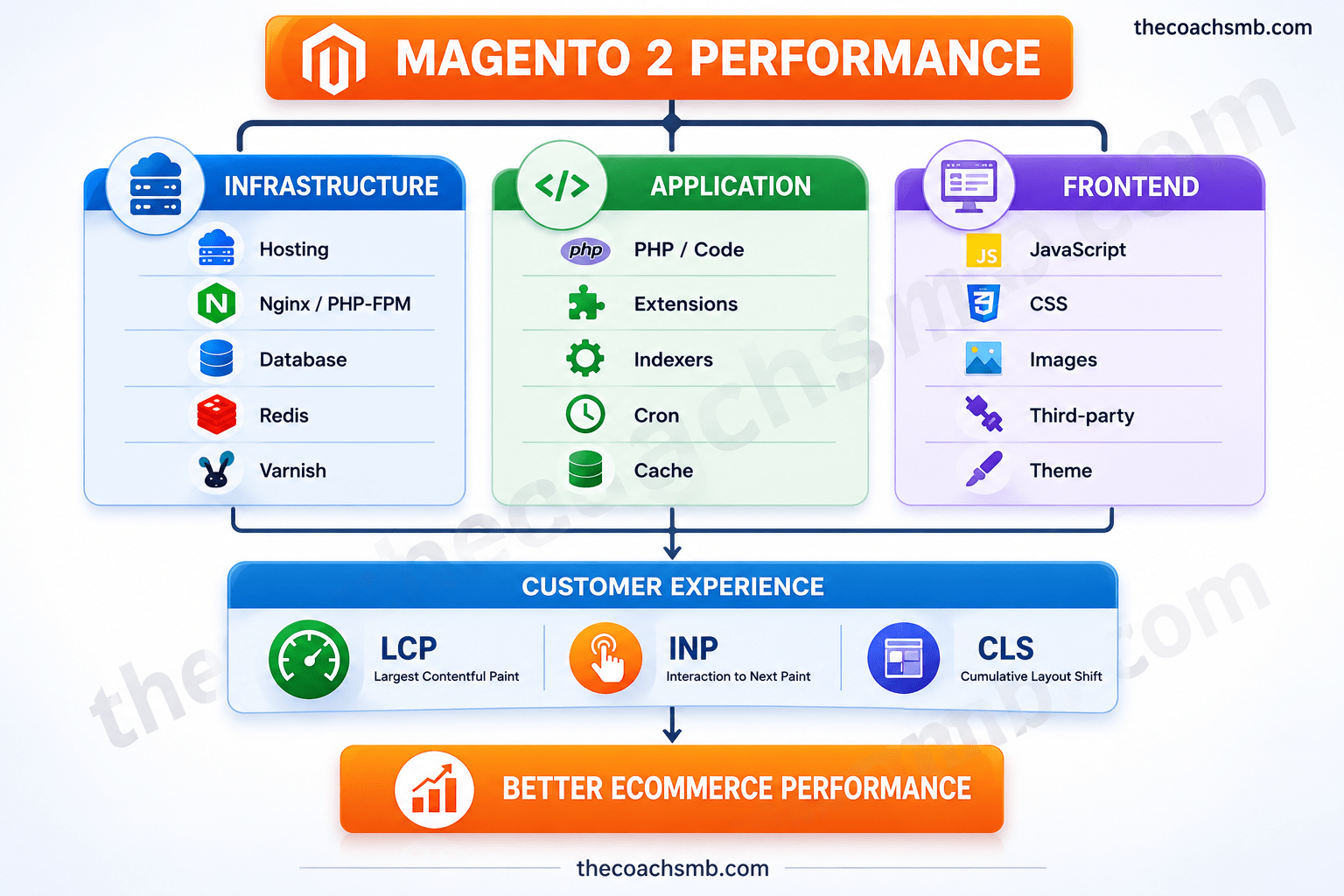
A fast Magento store is therefore not created by one setting.
It is created by the interaction between infrastructure, application architecture, frontend implementation and real-user experience.
How I Diagnose a Slow Magento 2 Store
If I were investigating a slow Magento store, I would not start by changing ten settings.
I’d work through the system in this order:
1. Establish the baseline
Measure:
- PageSpeed Insights
- Core Web Vitals
- TTFB
- LCP
- INP
- CLS
- page weight
- request count
2. Segment the problem
Test separately:
- homepage
- category page
- product page
- search
- cart
- checkout
A store can have a fast homepage and a slow product page—or vice versa.
3. Identify the bottleneck
Determine whether the primary issue is:
Server → Magento → database → extension → JavaScript → CSS → images → third-party services
4. Prioritize by business impact
Don’t spend five hours removing a tiny JavaScript file while the server takes two seconds to return the first byte.
Fix the biggest constraint first.
5. Measure again
Every performance change should have:
Before → Change → After
Otherwise, you’re optimizing based on assumptions.
Magento 2 Speed Optimization and SEO
Performance is also part of the broader Magento 2 SEO picture.
But there is an important distinction:
SEO is not simply “make the PageSpeed score green.”
Technical SEO involves crawlability, indexation, canonicalization, URL architecture, internal linking and other factors.
Performance affects the user experience and page experience, while technical SEO determines whether search engines can efficiently discover, understand and index the right pages.
For an ecommerce store, these systems need to work together.
A technically excellent site that cannot be crawled properly has an SEO problem.
A well-indexed site that frustrates customers with a slow checkout has a commerce problem.
The strongest Magento stores address both.
Final Checklist
Before declaring a Magento 2 performance project complete, check:
- Production mode enabled
- Static content properly deployed
- Full-page caching configured
- Appropriate CDN/cache architecture
- Hosting capacity validated
- Database performance reviewed
- Indexers configured appropriately
- Cron jobs reviewed
- Third-party extensions audited
- JavaScript audited
- CSS audited
- Images optimized
- LCP measured
- INP measured
- CLS measured
- Mobile performance tested
- Real-user/field data reviewed
- Before/after measurements documented
The most important lesson
Don’t optimize Magento by following a checklist blindly.
A recommendation that worked for Magento 2 several years ago may be wrong for a current Magento release.
For example, Flat Catalog is a perfect illustration: older Magento performance articles commonly recommended it, while Adobe’s current documentation explicitly advises against using it as a best practice.
The right approach is to understand why the store is slow, identify the bottleneck, make the smallest effective change, and measure the result.
That’s how Magento performance optimization should be approached:
Measure → Diagnose → Prioritize → Optimize → Validate → Monitor.
Keep Learning, Thank you !!